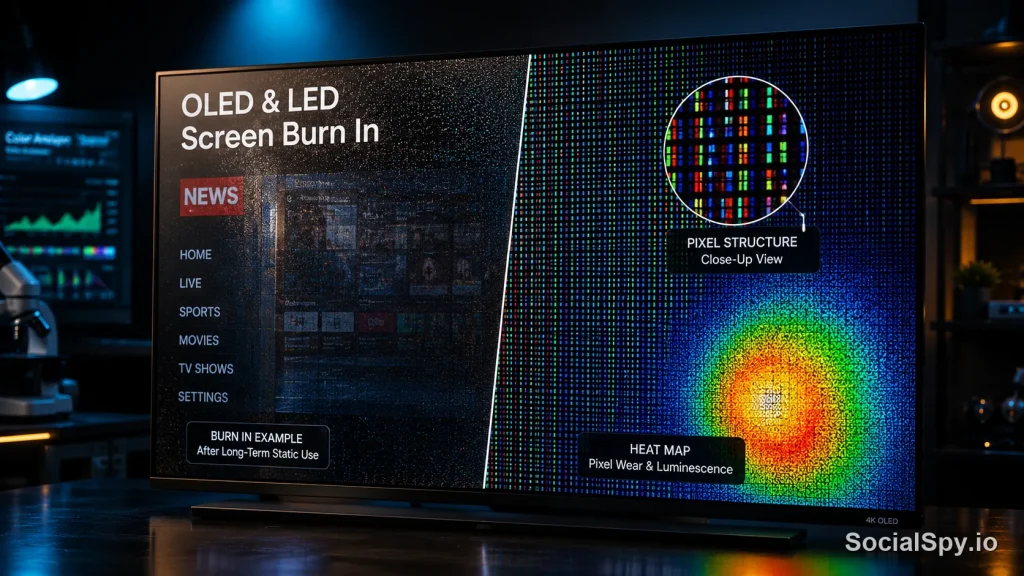
LED televisions and monitors dominate living rooms and desks across the US, but a persistent question keeps popping up in forums and product reviews: can these screens actually suffer permanent burn-in like their OLED cousins? The short answer involves more nuance than most retailers admit, and understanding it can save you money on your next TV or gaming monitor purchase.
What LED Burn-In Actually Is (And Isn’t)
LED burn-in gets thrown around loosely, so it helps to separate the terminology first. In a standard LED TV, the “LED” refers to the backlight — an array of light-emitting diodes sitting behind a liquid crystal (LCD) panel that does the actual image forming. This is fundamentally different from OLED, where each pixel is its own tiny light source that can degrade individually.
Because the backlight in an LED-LCD TV illuminates the whole panel (or large zones of it) rather than individual pixels, uneven wear is much harder to produce. That’s the core reason LED-LCD screens have a reputation for being “burn-in proof.”
- True burn-in: A permanent chemical change in the display material causing a ghost image, seen mainly in OLED and older plasma displays.
- Image retention: A temporary afterimage that fades within minutes to hours, more common on LCD panels including LED-backlit ones.
- Uneven backlight aging: Rare but possible in Mini-LED sets, where specific dimming zones age faster than others after extreme, repetitive use.
Industry display engineers generally classify LED-LCD “burn-in” complaints as one of these three categories, and the vast majority turn out to be temporary image retention rather than anything permanent.
Why LED-LCD Screens Resist Burn-In Better Than OLED
The physical construction of LED-backlit LCDs gives them a structural advantage. Here’s a side-by-side look at how the two technologies differ in what actually degrades over time.
| Factor | LED-Backlit LCD | OLED |
|---|---|---|
| Light source | Shared backlight (edge-lit or full-array) | Self-emissive per-pixel diodes |
| Degradation risk | Backlight dims uniformly over ~60,000 hours | Individual organic pixels degrade at different rates |
| Static image risk | Low — pixels don’t “age” from light exposure | Higher — red, green, blue subpixels wear unevenly |
| Typical lifespan before noticeable dimming | 7-10 years of average use | 5-8 years with heavy static content |
| Fix for retention | Usually resolves in minutes to hours | Can require pixel-refresher cycles or is permanent |
Display industry lifespan estimates from panel manufacturers like LG Display and Samsung Display consistently put standard LED-LCD backlight half-life (the point at which brightness drops 50%) well beyond 50,000 hours of use — roughly 15-plus years at average American TV usage rates of around 5 hours a day.
This doesn’t mean LED-LCD is invincible. It means the failure mode looks different: instead of a ghostly CNN logo burned into the panel, you’re more likely to see gradual overall dimming or minor clouding near the edges of the panel from backlight bleed.
Mini-LED Changes the Equation Slightly
Mini-LED, the technology behind premium sets like Samsung’s Neo QLED lineup, TCL’s QM-series, and Hisense’s U8 line, complicates the “LED can’t burn in” narrative. These TVs use thousands of tiny LEDs organized into local dimming zones — some 2026 flagship models pack over 2,000 dimming zones into a single panel.
That granularity is what makes Mini-LED pictures look so much better than older edge-lit sets, with deeper blacks and brighter highlights. But it also means individual zones can, in theory, be driven harder and more frequently than their neighbors.
Where the risk actually shows up
- Static HUDs in games: A health bar or minimap displayed in the same corner for hundreds of hours can cause that dimming zone to degrade slightly faster.
- News tickers and channel logos: Cable news is the classic culprit, with a bug in the same screen position for years of daily viewing.
- Digital signage and control rooms: Airport displays, stock tickers, and security monitors that run 24/7 with mostly static layouts.
- Extreme brightness settings: Running a Mini-LED panel at maximum brightness for extended periods accelerates diode wear more than moderate brightness ever would.
Even with these risk factors, manufacturers and independent test labs report that true permanent burn-in on Mini-LED remains rare compared to OLED. What you’re more likely to see is a subtle “zone banding” effect that’s noticeable mainly on solid gray backgrounds rather than a distinct ghost image.
Real-World Scenarios That Cause Image Retention
Most complaints people label as “LED burn-in” are actually temporary image retention, and it’s worth knowing exactly what triggers it so you can avoid unnecessary panic — or an unnecessary warranty claim.
- Extended gaming sessions with static UI elements. Leaving a paused game or a fixed inventory screen up for many hours can leave a faint afterimage that fades within an hour of normal content.
- Split-screen work setups. Using an LED monitor as a stock ticker or spreadsheet display for a full workday, every day, for months.
- Store demo mode left running. Retail floor models often show this because they display the same demo loop for months on end at high brightness.
- Security camera feeds. Fixed camera views with timestamp overlays running continuously.
- Old console dashboard screens. Menu screens left idle on a paused system for days at a time.
In nearly all of these cases, running varied, moving content for a few hours resolves the issue completely. If an afterimage on an LED-LCD panel is still visible after 24 hours of mixed content, that points toward a hardware defect rather than typical image retention — and it’s worth contacting the manufacturer.
How to Protect Your LED TV or Monitor in 2026
Modern LED and Mini-LED displays ship with several built-in safeguards, but a few habits make a measurable difference, especially if you’re running the display for work, gaming, or signage purposes.
- Enable pixel-shift or screen-shift features. Many 2026 Samsung, LG, and Sony LED models include a subtle image-shifting function (sometimes buried in picture or general settings) that nudges the image by a few pixels periodically.
- Avoid parking the display at max brightness for static content. Dropping brightness by even 20-30% for desktop work or paused games meaningfully reduces backlight stress.
- Use screensavers or auto-dim on PC monitors. Windows and macOS both have built-in idle-timeout settings that darken or blank the screen after a set period.
- Rotate content on digital signage. If you manage displays for a business, cycle static graphics with dynamic content instead of a single fixed layout.
- Update firmware regularly. TV manufacturers periodically release firmware updates in 2026 that improve local dimming algorithms and reduce unnecessary zone strain.
Here’s a quick comparison of built-in protective features you’ll typically find across current display categories:
| Feature | Standard LED TV | Mini-LED TV | Gaming Monitor |
|---|---|---|---|
| Pixel-shift / screen-shift | Rarely included | Common on premium 2026 models | Sometimes on high-end panels |
| Auto-brightness limiter | Basic ambient sensor | Advanced ABL with zone control | Manufacturer-dependent |
| Idle detection | Rare | Increasingly common | Yes, via OS settings |
| Manufacturer burn-in warranty | Not typically needed | Not typically needed | N/A (not an OLED concern) |
LED vs. OLED Warranty Reality Check
One overlooked angle: because true burn-in is rare on LED-LCD and Mini-LED panels, manufacturers generally don’t offer special burn-in warranty coverage for them the way some do for OLED commercial displays. That’s actually a point in favor of LED technology for certain use cases.
- Sports bars and restaurants: Venues that display the same scoreboard graphic or menu board for 10+ hours daily often choose LED-LCD or Mini-LED specifically to sidestep OLED burn-in liability.
- Home office monitors: Anyone running the same spreadsheet grid or IDE layout for 8 hours a day benefits from LED-LCD’s more forgiving nature.
- Gaming: Competitive gamers who stare at the same HUD for thousands of hours a year face a much smaller retention risk on LED-LCD monitors than on OLED gaming monitors, though OLED’s motion clarity and contrast remain superior.
This tradeoff — OLED’s superior picture quality against LED-LCD’s superior resistance to static-image wear — is exactly why the display market in 2026 hasn’t consolidated around a single winning technology. Each serves a different risk tolerance and use case.
Conclusion
LED burn-in, in the strict permanent-damage sense that plagues OLED panels, is genuinely uncommon on standard LED-backlit LCD televisions and monitors, and even Mini-LED’s more sophisticated zone-based backlighting only introduces a modest, largely avoidable risk. What most people experience and mislabel as burn-in is temporary image retention that resolves with normal, varied viewing. If you’re shopping in 2026 for a TV that will spend long hours on the same channel, the same game HUD, or the same digital signage loop, an LED-LCD or Mini-LED panel remains the safer long-term bet — just pair it with sensible brightness habits and, if available, the pixel-shift setting buried in your TV’s menu.
FAQ
It’s extremely unlikely with a standard LED-backlit LCD TV because the backlight and image-forming liquid crystal layer are separate components, so static content doesn’t wear individual pixels the way it does on OLED. What people usually see instead is temporary image retention that fades after a few hours of varied viewing.
Mini-LED carries a slightly higher theoretical risk because it uses thousands of individually controlled local dimming zones that can be driven unevenly by long-term static content, but documented cases of permanent damage remain rare in 2026 compared to OLED. Most reported issues are minor zone-brightness inconsistency rather than a visible ghost image.
Play varied, full-motion content at moderate brightness for a few hours, since this is usually enough to let the LCD panel and backlight return to a uniform state. If a faint image is still visible after 24 hours of mixed content, it may indicate a hardware issue worth raising with the manufacturer rather than typical image retention.