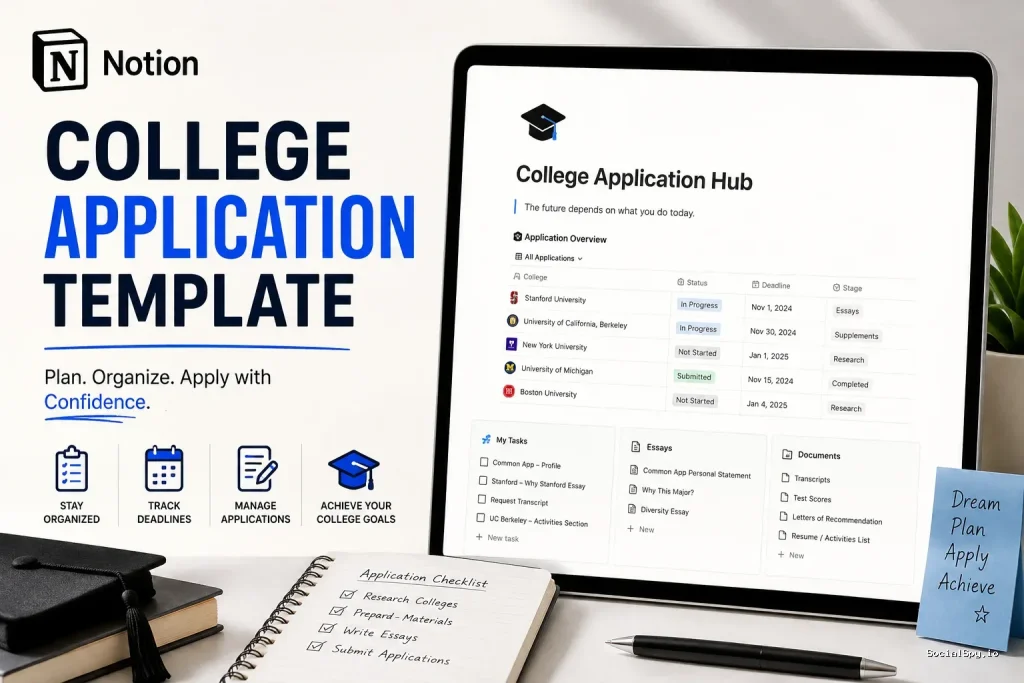
College application season has turned into a spreadsheet-and-sticky-notes nightmare for millions of families, which is exactly why Notion college application templates have exploded in popularity this fall. Students juggling a dozen schools, each with different deadlines, essay prompts, and portal logins, need something more forgiving than a paper checklist taped to a bedroom wall. This guide breaks down what these templates actually do, how to build or buy one, and whether the trend is worth the setup time.
Why Students Are Ditching Spreadsheets for Notion
Google Sheets has been the default college-planning tool for over a decade, but it has real limits. A spreadsheet can hold dates and checkboxes fine, but it can’t nest an essay draft, a recommender’s contact info, and a financial aid deadline inside a single row without becoming visually unreadable.
Notion solves this with relational databases, where each college is its own entry that opens into a full page of subtasks, notes, and linked documents. That structural difference is why counselors and college-prep coaches have shifted their default recommendation over the past two admissions cycles.
- Sheets are good for quick sorting and simple deadline tracking.
- Notion is better for anything requiring nested detail—essay drafts, interview notes, financial aid documents.
- Notion templates sync across phone, tablet, and desktop, which matters when a student is checking a portal from their locker between classes.
- Sheets require manual formatting for status colors and filters; Notion databases handle this natively with tags and views.
Early adopters among college counselors report that students using structured digital dashboards submit fewer applications with missing supplemental materials than those relying on printed checklists or shared family spreadsheets.
The bigger shift, though, is emotional rather than technical. A cluttered spreadsheet with fifteen tabs feels overwhelming to open. A clean Notion dashboard with a progress bar at the top feels manageable, and that psychological difference keeps students from procrastinating on the app that scares them most.
What a Solid Template Actually Includes
Not all Notion college application templates are created equal. Many free versions floating around social media are just a single database with three columns, which barely improves on a spreadsheet. A genuinely useful template needs several interlocking pieces.
The Core Database
This is the master list of every school, and it should include more than just a name and a due date. The strongest templates use these properties:
- School name and type (Early Decision, Early Action, Regular Decision, Rolling)
- Deadline date, formatted so Notion can auto-calculate days remaining
- Application platform (Common App, Coalition App, school-specific portal)
- Status tag (Not Started, In Progress, Submitted, Waitlisted, Decision Received)
- Application fee and fee waiver status
- Financial aid deadline, tracked separately since it’s often earlier than the admission deadline
Essay and Supplement Tracking
Every school’s supplemental essays deserve their own sub-page linked to the main database entry. Students can draft, revise, and store word counts directly inside Notion instead of juggling a dozen Google Docs with confusing filenames like “Essay_FINAL_v3_ACTUALFINAL.”
Recommendation Letter Tracker
A separate mini-database tracks which teachers or counselors have been asked, whether they’ve confirmed, and the platform-specific submission deadline for each letter—since Common App and individual portals sometimes have different cutoffs for the same recommender.
Building Your Own Template From Scratch
Some students prefer to build their own rather than download a pre-made template, mostly because customizing someone else’s structure often takes longer than starting fresh. Here’s a realistic build order that takes about 45 minutes for someone with basic Notion familiarity.
- Create a new page titled “College Application Hub” and set it as a full-page database.
- Add properties: Status, Deadline, Application Type, Platform, Fee, Financial Aid Deadline.
- Build three views—Board view grouped by Status, Calendar view sorted by Deadline, and Table view for a full data dump.
- Create a linked sub-database for essays, filtered to show only entries connected to the current school when opened from its page.
- Add a Recommendation Letters database with a relation property connecting back to each school.
- Build a dashboard homepage with a rollup showing total schools, submitted count, and days until the nearest deadline.
Students who want their dashboard to feel less clinical often spend extra time on cover images and color themes for each school page—a small touch, but one that makes daily use less tedious. If aesthetics matter to you, it’s worth reading up on how flexible Notion actually is with page styling, since the same customization principles covered in Can You Change Background in Notion apply directly to making a college dashboard feel less like a chore and more like a personal project.
Where to Find Ready-Made Templates
For students who don’t want to build from scratch, the Notion template marketplace and independent creators sell polished versions ranging from free to around $25. Pricing generally correlates with how much automation and design work went into the template.
| Template Tier | Typical Price | What You Get |
|---|---|---|
| Free community templates | $0 | Basic database, single view, minimal design |
| Mid-tier creator templates | $8–$15 | Multiple views, essay tracker, dashboard homepage |
| Premium counselor-built templates | $18–$30 | Financial aid tracker, scholarship database, interview prep pages, video walkthrough |
A few things worth checking before paying for any template:
- Does it include a scholarship tracker separate from admissions, since scholarship deadlines often don’t align with application deadlines?
- Is it built with the current Common App structure in mind, since the platform tweaks its supplemental essay format almost every cycle?
- Does the seller offer updates, or is it a one-time purchase with no support if Notion changes its database interface?
Premium templates from established college-prep creators tend to be worth the money if a student is applying to eight or more schools, simply because the automation saves hours that would otherwise go into manually copying deadline structures for each new entry.
Advanced Features Power Users Are Adding
Beyond the basics, some of the more resourceful students have started layering additional Notion functionality onto their college dashboards to make them genuinely predictive rather than just a static list.
Formula-Based Countdown Timers
Using Notion’s formula property, students can create a live countdown showing exactly how many days remain until each deadline, color-coded red when under 14 days. This single feature does more to prevent last-minute panic than any reminder app.
Calendar Integration
Rather than relying solely on Notion’s built-in calendar view, some students sync their application dashboard with external calendar tools so deadlines show up alongside school assignments and extracurricular commitments. If you’re building this kind of cross-platform setup, the overview in Notion Calendar Widget is a useful reference for getting deadlines to surface outside of Notion itself, which matters on days when a student isn’t actively opening the app.
Application Portfolio Snapshot
A rollup page pulling together GPA, test scores, extracurricular hours, and a short personal statement draft gives students—and sometimes parents helping proofread—a single-page snapshot of the whole application profile. This is especially useful heading into interviews, where recalling specific numbers on the spot matters.
Counselors who’ve reviewed student dashboards note that the students who build a single “profile snapshot” page tend to give noticeably more confident, specific answers in alumni interviews, since they’re not scrambling to remember details under pressure.
Common Mistakes Students Make With These Templates
A dashboard is only as useful as the habits built around it. Several recurring mistakes show up across students who abandon their Notion setup halfway through application season.
- Setting it up once and never updating status tags, which defeats the entire purpose of a live tracker.
- Overloading the template with unnecessary properties before even applying anywhere, leading to setup fatigue instead of actual progress.
- Not backing up essay drafts outside Notion, which matters since students still need to paste final text into Common App or portal text boxes, and copy-paste formatting issues are common.
- Ignoring the financial aid deadline column entirely, since it’s easy to fixate on admission deadlines and forget CSS Profile or FAFSA-related dates tied to specific schools.
- Sharing edit access carelessly with siblings or friends who then accidentally alter deadline dates or delete essay drafts.
The fix for most of these is simple: treat the Notion dashboard like a daily five-minute check-in rather than a one-time setup project. Students who build a recurring reminder—even something as basic as a phone alarm labeled “check college dashboard”—maintain accuracy far better than those who rely on memory alone.
Conclusion
A Notion college application template isn’t magic, and it won’t write a single essay for a student. What it does is remove the mental overhead of tracking a dozen moving parts across a dozen schools, which frees up actual thinking time for the parts that matter—the essays, the interviews, the decisions about where to actually apply. Whether a student builds their own from scratch in under an hour or buys a $20 premium version from a college-prep creator, the underlying value is the same: one dashboard, one source of truth, fewer missed deadlines during the most stressful stretch of high school.
FAQ
For most students applying to more than four or five schools, yes—Notion’s relational databases let you nest essay drafts, recommender info, and financial aid deadlines inside each school’s entry, something a flat spreadsheet handles poorly once the data gets complex.
No, Notion’s free personal plan supports everything needed for a college application dashboard, including databases, formulas, and multiple views; paid plans mainly add collaboration features that most individual students don’t need.
Yes, Notion allows view-only sharing permissions, so you can give a parent or counselor a link that lets them see deadlines and progress without risking accidental edits to your essay drafts or database structure.