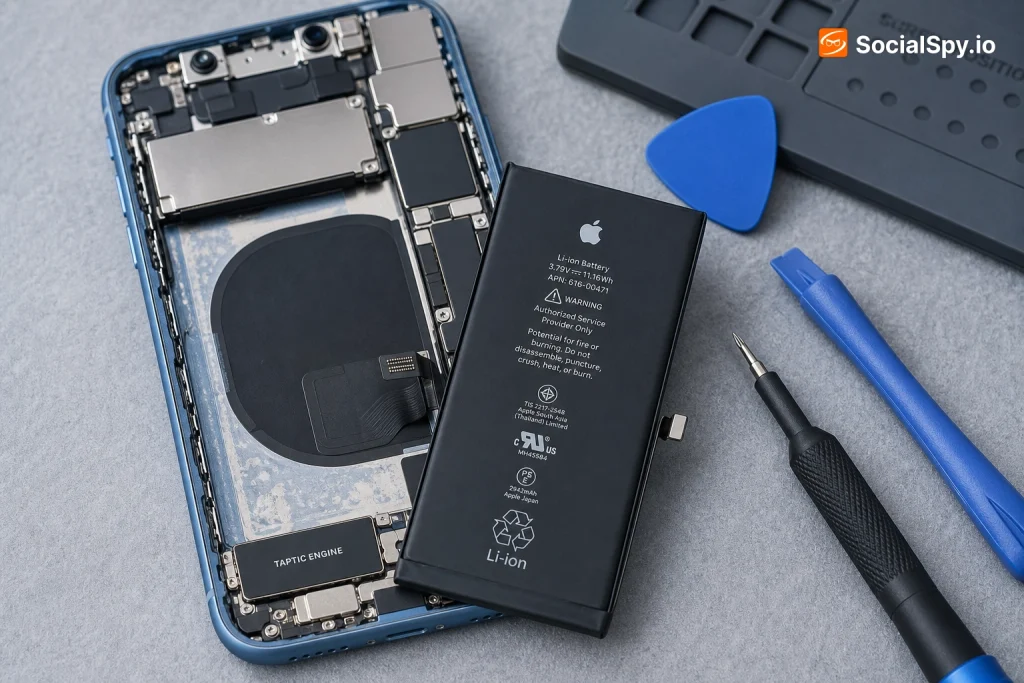
The iPhone XR is now over six years old, and battery degradation has become the top complaint among owners still holding onto Apple’s best-selling 2018 model. If your XR is dying by 2pm, throttling under load, or shutting off unexpectedly at 20% charge, a battery swap is almost always cheaper than a new phone.
Why the iPhone XR Battery Wears Out So Fast
The iPhone XR shipped with a 2,942mAh lithium-ion battery, rated by Apple for up to 25 hours of talk time and 15 hours of internet use when new. Lithium-ion cells degrade with every charge cycle, and Apple defines a cycle as one full 0-100% discharge, whether that happens in one day or spread across three.
Apple considers a battery “normal” if it holds 80% or more of its original capacity after 500 complete charge cycles. Most XR units hit that threshold somewhere between two and three years of typical daily use, which tracks with why so many owners are now dealing with this in 2024 and 2025.
The Telltale Signs
Here’s what actually happens to an iPhone XR as the battery ages, based on patterns repair technicians see constantly:
- Sudden shutdowns at 20-30% remaining charge, even though the phone reports having power left
- Performance throttling — Apple’s built-in feature that slows the CPU to prevent unexpected shutdowns on a degraded battery
- Battery drains overnight even in Airplane Mode, sometimes losing 15-20% while sitting untouched
- Swelling — a genuinely dangerous sign; a puffed-up screen or battery bulge means stop using the phone immediately
- Maximum Capacity below 80% as shown in Settings > Battery > Battery Health & Charging
You can check your exact battery health right now: go to Settings > Battery > Battery Health & Charging. If “Maximum Capacity” reads anywhere below 80%, Apple’s own diagnostics will flag it and recommend service.
What Apple Charges for an Official Replacement
Apple’s pricing for the XR sits in the mid-range of its lineup, more expensive than older iPhones but cheaper than Pro models with larger batteries.
| Service Type | Cost | Turnaround |
|---|---|---|
| Out-of-warranty replacement | $69 | Same day (walk-in) to 3-5 days (mail-in) |
| Under AppleCare+ | $0 | Same as above |
| Under standard warranty (defective battery only) | $0 | Same as above |
Apple’s $69 price point for the XR has held steady since 2020, making it one of the more predictable repair costs in the smartphone world — unlike screen repairs, which have crept upward with each new model generation.
Apple performs this repair at Apple Stores, through mail-in service via support.apple.com, and at Apple Authorized Service Providers like Best Buy locations with dedicated Apple repair counters. All three use genuine Apple parts and come with a 90-day warranty on the repair.
One detail people miss: if diagnostics at the Genius Bar find another issue causing the battery drain — a bad logic board, for instance — Apple will quote that separately. The $69 flat rate only applies when the battery itself is the confirmed problem.
Third-Party Repair Shops vs. DIY: The Real Cost Breakdown
Independent repair shops like uBreakiFix (now Asurion Tech Repair & Solutions), CPR Cell Phone Repair, and countless local mom-and-pop shops offer XR battery swaps too, usually undercutting Apple slightly on labor but with more variance in part quality.
Third-Party Shop Pricing
- Chain repair shops (uBreakiFix/Asurion, CPR): typically $50-$80, often with a lifetime warranty on the battery itself
- Independent local shops: anywhere from $40-$70, quality varies widely by shop
- Mobile repair services (they come to you): $60-$100, convenience premium built in
- Turnaround at most shops: 15-45 minutes, often while you wait
The tradeoff is part sourcing. Apple uses only genuine batteries with the original battery management IC that reports accurate health data back to iOS. Many third-party shops use aftermarket cells from suppliers, which can be perfectly functional but sometimes trigger a “non-genuine part” warning in Settings — cosmetic in most cases, but worth asking about upfront.
DIY Replacement: What You’re Actually Getting Into
Buying a replacement battery kit and doing it yourself is the cheapest path on paper, but it’s not for everyone.
- Kit cost: $25-$45 on sites like iFixit, which includes the battery, adhesive strips, and the necessary Y000 pentalobe and Phillips screwdrivers
- Time required: iFixit rates the XR battery swap as roughly 30-45 minutes for someone following the guide carefully, though first-timers often take 60-90 minutes
- Difficulty: iFixit rates it a 3 out of 5 — moderate, involving screen removal, display cable disconnection, and prying out adhesive-bonded battery cells
A crucial DIY-specific detail: the iPhone XR battery is held in with stretch-release adhesive strips, not glue that requires isopropyl alcohol and heat like older models. Pulling too fast can tear the strip and force you to pry the battery out — risky, since punctured lithium-ion cells can catch fire.
DIY makes sense if you’re comfortable with small electronics repair and have done a phone teardown before. If this is your first repair ever, the XR is a reasonable starter project, but budget extra time and don’t rush the adhesive removal step.
What Actually Happens During the Repair
Whether you go to Apple or a third-party shop, the physical process is nearly identical. Knowing the steps helps you understand what you’re paying for and spot a rushed job.
- Powering down and removing two pentalobe screws at the bottom of the phone near the charging port
- Heating or prying the display away from the frame using a suction cup and opening picks — the XR’s display is fused with a厚 adhesive seal that also provides water resistance
- Disconnecting the battery connector first as a safety step before touching anything else, then removing display cables
- Pulling the stretch-release adhesive tabs to lift the old battery out without prying (prying is the risky part that causes punctures)
- Installing the new battery, reconnecting cables in reverse order, and applying fresh adhesive to reseal the display
- Running a battery calibration cycle — draining to 0% and doing a full uninterrupted charge to reset the battery percentage algorithm
That last step matters more than people realize. Skipping calibration is why some people report their “new” battery still showing weird percentage jumps for the first week after a swap.
One Thing You Lose Without Genuine Parts
Since iOS 11.3, Apple has required a battery service pairing for full functionality. Without it, even a physically fine aftermarket battery may show:
- “Unable to verify this iPhone has a genuine Apple battery” warning in Battery Health settings
- Missing Battery Health percentage data, though the phone still functions normally
- No actual performance penalty — this is a data/warning issue, not a functional one
Apple Stores and Authorized Service Providers have the tools to pair batteries properly; most independent shops don’t, which is the real tradeoff for saving $10-$20.
Battery vs. New Phone: The Math That Actually Matters
Given that a used iPhone XR now sells for roughly $80-$150 depending on condition and carrier lock status, a lot of owners genuinely wonder whether replacing a $69 battery is even worth it versus just buying a newer used device.
Here’s a clearer comparison:
| Factor | Battery Replacement | Used iPhone Upgrade |
|---|---|---|
| Typical cost | $50-$90 | $150-$400+ (iPhone 12/13 used) |
| Time to get working phone | Same day | Shipping/pickup time |
| Software support | XR supports iOS through at least iOS 17-18 era | Newer models get updates longer |
| Camera/performance gains | None | Noticeable, especially camera |
| Environmental impact | Lower — extends device life | Higher — new manufacturing footprint |
The honest answer: if your XR’s only problem is battery life and everything else — screen, cameras, buttons, storage — works fine, a $69 battery swap is one of the best value repairs in consumer electronics. It’s roughly the cost of two months of a mid-tier phone payment plan, and it can add 1-2 more years of solid daily use to a phone that otherwise still runs iOS smoothly.
Where the math flips is if your XR is also dealing with a cracked screen, water damage history, or storage capacity that was already too small (the 64GB base model struggles with modern app sizes and iOS updates). Stacking a $69 battery on top of a $130 screen repair starts approaching used-upgrade territory.
Conclusion
The iPhone XR remains one of the easiest and most cost-effective repair candidates in Apple’s back catalog, precisely because the battery swap process hasn’t changed much since launch and Apple has kept its $69 price frozen for years. For most owners still happy with their XR’s screen quality and iOS performance, a battery replacement is the rational move — it’s cheap, fast, and backed by a 90-day warranty if you go through Apple or an Authorized Service Provider. The calculus only shifts toward buying a newer used phone once other components start failing simultaneously, at which point the accumulated repair costs start rivaling what a used iPhone 12 or 13 costs on the secondhand market.
FAQ
Check Settings > Battery > Battery Health & Charging first. If Maximum Capacity is below 80% or you see a message about “Peak Performance Capability” being reduced, the battery is confirmed as the issue rather than a software glitch or app-specific drain problem.
Yes, in the vast majority of cases. Both symptoms are caused by the same degraded lithium-ion cell struggling to deliver peak voltage, and Apple’s performance-throttling feature specifically kicks in to prevent those shutdowns — once a healthy battery is installed, both issues typically disappear together.
It’s not dangerous if the shop is reputable, but you may lose accurate Battery Health reporting in Settings due to Apple’s battery pairing system, and quality can vary more than with genuine Apple parts — sticking with Apple, an Apple Authorized Service Provider, or a well-reviewed chain like uBreakiFix/Asurion minimizes that risk.