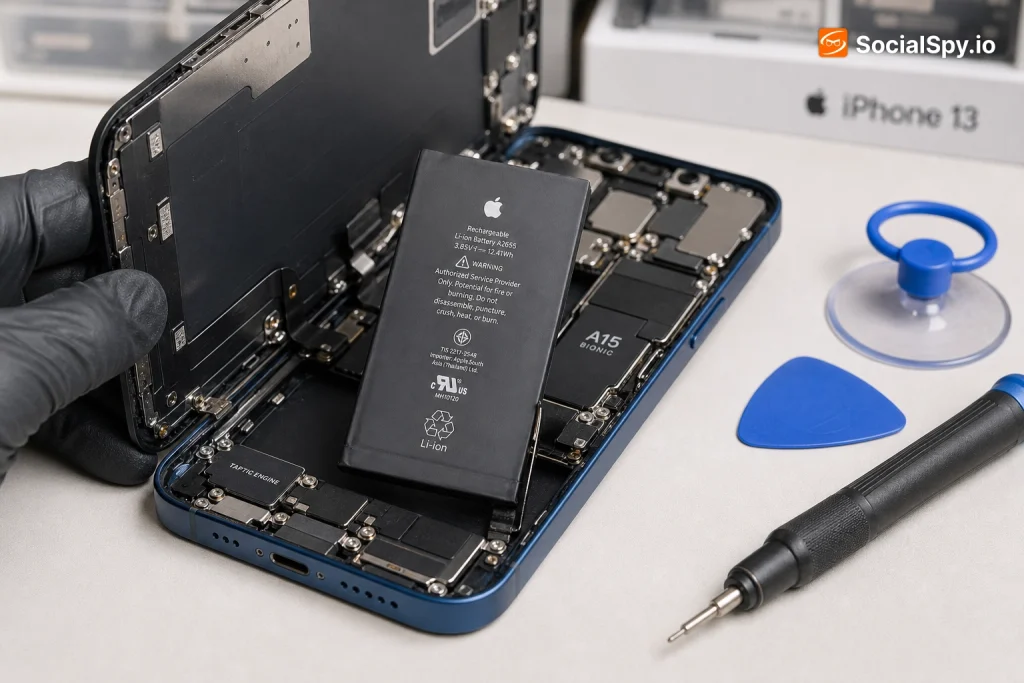
The iPhone 13 launched in September 2021, which means most units are now well past the two-year mark where lithium-ion batteries start showing their age. If your phone is dying by mid-afternoon or throttling performance under normal use, a battery swap is likely the fix — and it’s far cheaper than buying a new phone.
How Much Does It Actually Cost?
Pricing for an iPhone 13 battery swap varies more than most people expect, mainly because Apple, independent repair shops, and DIY kits all source parts differently. Apple uses genuine lithium-ion cells calibrated specifically for the iPhone 13’s logic board, which is part of why its price sits higher than most third-party alternatives.
- Apple Store or mail-in service: $89 flat rate for out-of-warranty repairs
- AppleCare+ subscribers: $0 if battery health has dropped to 79% or below (Apple’s official threshold for free replacement under warranty)
- Independent repair shops (like uBreakiFix, CPR Cell Phone Repair, or local shops): typically $60 to $100, depending on region and parts quality
- DIY replacement kits (iFixit, Injustor, or similar): $25 to $45 for the battery itself, plus your own labor and tools
Industry repair-cost trackers consistently show Apple’s official price as the most predictable option, but independent shops in lower cost-of-living regions can undercut it by 15-30%.
It’s worth noting that Apple’s $89 price point has held steady since the iPhone 13 debuted, unlike earlier models where pricing crept up over time. That’s a small win for consumers, especially compared to how the iPhone 12 Pro battery replacement pricing has shifted in some markets.
Is Your Battery Actually the Problem?
Before paying anyone to replace anything, confirm the battery is actually degraded. Apple builds a diagnostic tool directly into iOS that most users never check.
Checking Battery Health on iOS
- Open Settings, then tap Battery
- Tap Battery Health & Charging
- Look at the Maximum Capacity percentage
- If it reads 80% or below, Apple officially considers the battery “degraded”
- Check for the phrase “Peak Performance Capability” — if it says your battery is not currently supporting peak performance, that’s a strong signal
Apple’s own service documentation states the iPhone 13 battery is rated for 500 complete charge cycles before dropping to roughly 80% of original capacity, which typically translates to somewhere between 18 and 30 months of normal daily use depending on charging habits. Heavy fast-chargers and people who let their phone hit 0% regularly tend to see faster degradation.
Symptoms Beyond the Percentage
- Phone shuts down unexpectedly even when the display says 20-30% remaining
- Noticeable performance throttling (apps launching slower, animations stuttering)
- Battery draining significantly faster in cold weather
- Phone feels warm during light tasks like scrolling or texting
- Charging takes noticeably longer than it used to
If you’re seeing two or more of these alongside a Maximum Capacity reading under 80%, the battery is almost certainly the culprit rather than a software issue.
Apple Store vs. Third-Party Repair: What Actually Changes
This decision matters more for the iPhone 13 than it did for older models because of a specific Apple software behavior tied to battery serialization.
Since iOS 15.2, Apple’s software checks whether a replacement battery has a genuine Apple-paired serial number. If a non-genuine or improperly paired battery is installed, iOS displays a persistent “Important Battery Message” warning in Settings and disables the Battery Health percentage readout entirely — even if the physical battery itself works fine.
| Factor | Apple Store/Authorized | Independent Shop | DIY Kit |
|---|---|---|---|
| Price | $89 | $60-$100 | $25-$45 |
| Battery Health % display | Fully functional | May show warning | May show warning |
| Warranty | 90 days from Apple | Varies by shop, often 90 days | None or seller-dependent |
| Turnaround time | Same day to 1-2 days (mail-in longer) | Often 1-3 hours | Depends on your skill |
| Genuine Apple part | Yes | Rarely | No |
Some independent shops have started using “programmer” tools that can re-pair a genuine pulled battery to restore the health percentage readout, but this workaround isn’t universal and adds cost. If keeping the native battery health display intact matters to you — say you plan to resell the phone later — that’s a real point in Apple’s favor.
What the Repair Process Actually Involves
The iPhone 13’s internal layout changed slightly from the iPhone 12 series, and it directly affects repair difficulty and pricing at independent shops.
Apple redesigned the internal battery connector and added new adhesive strips (Apple calls them “stretch-release” tabs) that are supposed to let the battery peel out without prying tools. In practice, many technicians report the adhesive is stronger than advertised, occasionally requiring isopropyl alcohol application and heat to loosen the bond safely.
What a Technician Does Step-by-Step
- Powers down the phone completely and removes the two pentalobe screws near the Lightning port
- Uses a suction tool and opening pick to separate the screen from the chassis (screen stays attached via ribbon cables)
- Disconnects the battery connector first as a safety precaution before removing any other components
- Pulls the adhesive tabs slowly at a low angle to release the battery — this is the step most prone to complications
- Cleans the tray, inserts and reconnects the new battery
- Reassembles the screen assembly and tests Face ID functionality (this is critical — see below)
- Runs a calibration cycle so iOS accurately reads the new battery’s capacity
The Face ID Risk Factor
This is the part most people don’t know about, and it’s specific to iPhone models with Face ID. If a repair technician disconnects or damages the TrueDepth camera ribbon cable during battery removal, Face ID can stop working entirely — and it cannot be fixed by reinstalling the cable, because Apple pairs the Face ID hardware to the logic board at the factory.
- Apple-authorized repairs: Face ID risk is minimal; technicians are trained specifically on this connector
- Skilled independent shops: Generally low risk, but ask upfront if they’ve serviced iPhone 13 units before
- DIY repairs: This is the single biggest reason iFixit rates the iPhone 13 battery swap as “moderate to difficult” for first-timers, despite the improved adhesive tabs
If Face ID breaks during a botched repair, there’s no independent fix — the entire logic board effectively needs replacing, which usually costs more than the phone is worth secondhand.
AppleCare+ and Warranty Considerations
AppleCare+ changes the math substantially, and it’s worth checking your coverage before paying anything out of pocket.
- If you have AppleCare+ and your battery health has dropped to 79% or below, Apple replaces it for free
- Without AppleCare+, Apple’s standard one-year limited warranty only covers battery replacement if the phone is defective — normal wear-and-tear degradation isn’t covered
- AppleCare+ costs roughly $9.99/month or a prepaid multi-year option, and battery coverage alone can justify the cost for heavy users who fast-charge frequently
There’s also a lesser-known nuance: if your iPhone 13 was affected by any Apple-issued service program (Apple occasionally runs free replacement programs for specific manufacturing batches), you can check eligibility using your serial number on Apple’s official support site before paying for anything. These programs are rare but have happened with prior iPhone generations, so it’s a five-minute check worth doing.
For context on how this compares across generations, the iPhone 12 battery replacement guide shows Apple has kept pricing structures fairly consistent model-to-model, which suggests the $89 rate is likely to hold for at least another year or two before Apple’s next pricing adjustment cycle.
Conclusion
The iPhone 13 sits in an unusually good spot for battery replacement economics. It’s recent enough that parts are widely available and independent shops have plenty of repair experience with it, but it’s old enough that Apple’s official $89 price point has had time to stabilize rather than fluctuate like it does right after a new model launches. For most owners, the Apple Store route is the safer bet specifically because of the Face ID pairing risk and the battery health serialization issue — paying an extra $10-$20 over the cheapest independent shop is cheap insurance against losing Face ID or getting a permanent warning banner in Settings. If your phone is more of a backup device or you’re mechanically confident, a DIY kit under $45 remains the best value, provided you watch a full teardown video first and take the TrueDepth camera connector seriously. Either way, replacing the battery is almost always the smarter financial move than upgrading, since a fresh battery can realistically add 2-3 more years of solid daily use to a phone that’s otherwise still fast and fully capable.
FAQ
At an Apple Store, most walk-in repairs take between 1 and 2 hours, though it can be same-day if parts are in stock. Mail-in service through Apple typically takes 5-9 business days round trip, while independent shops often complete the swap in under an hour.
No, a standard battery replacement doesn’t touch your storage or require erasing the device, since technicians don’t need to access the logic board’s storage chip. That said, it’s always smart to back up via iCloud or a computer beforehand in case of any unrelated issue during disassembly.
Yes, you can keep using it, but Apple’s performance management feature may throttle processing speed to prevent unexpected shutdowns once capacity drops significantly. Most people notice a real quality-of-life improvement after replacement, since the phone stops randomly dying at 20-30% and charges faster overall.