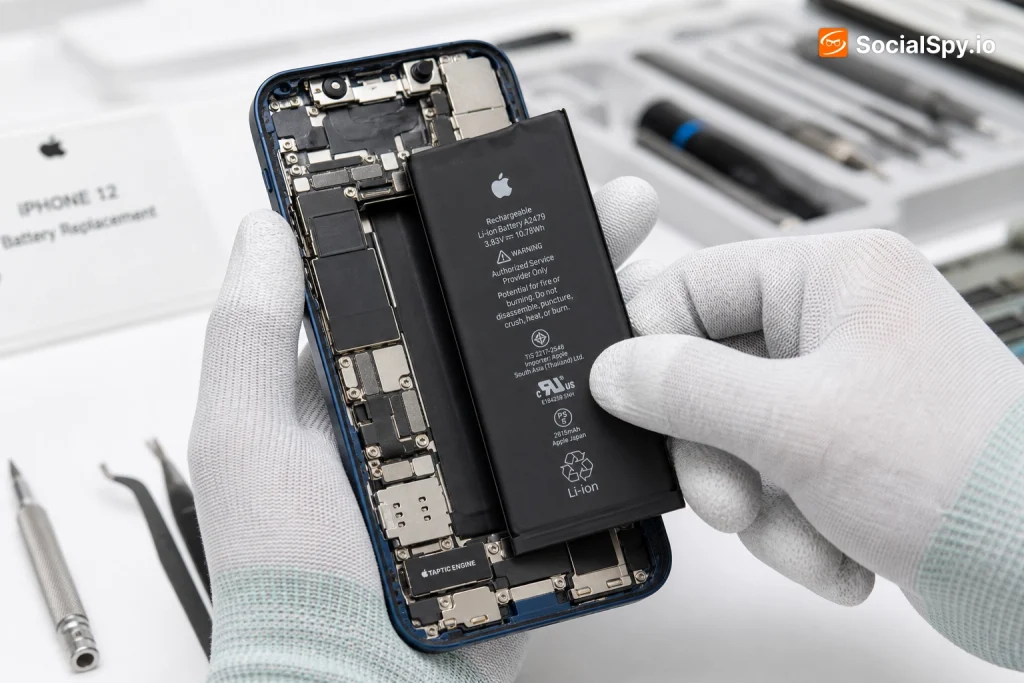
The iPhone 12, now over four years old, is hitting the point where lithium-ion batteries start showing their age. If your phone is dying by 3 PM or randomly shutting off at 20%, you’re not imagining it — you’re looking at classic battery degradation. Here’s exactly what replacement costs, when it’s worth it, and how to avoid getting overcharged.
Why Your iPhone 12 Battery Is Degrading Now
Apple builds the iPhone 12’s battery to retain 80% of its original capacity after 500 complete charge cycles, which the company defines as one full charge-to-empty cycle. For most people who charge daily, that threshold arrives somewhere between 18 and 30 months of regular use, depending on charging habits.
If you bought your iPhone 12 at launch in October 2020, you’re now four-plus years and well past that cycle count. That’s the core reason so many iPhone 12 owners are suddenly researching replacement costs in 2024 and 2025.
A few specific behaviors accelerate the decline:
- Frequent fast charging with 20W+ USB-C adapters generates more heat, which degrades lithium-ion cells faster than standard 5W charging.
- Letting the phone hit 0% regularly stresses the battery more than shallow discharge cycles.
- Leaving the phone in a hot car or direct sunlight — Apple explicitly warns against operating above 95°F (35°C).
- Using MagSafe wireless charging constantly instead of wired, since inductive charging runs warmer and less efficiently.
You can actually check your real-world capacity yourself. Go to Settings > Battery > Battery Health & Charging, and Apple will show your Maximum Capacity as a percentage. Anything below 80% is Apple’s own official threshold for “you should consider service.”
Industry battery-health data aggregated from repair shops suggests the average iPhone 12 in active daily use for three-plus years sits between 75% and 85% maximum capacity — right at the edge of Apple’s recommended replacement zone.
What Apple Actually Charges (And When It’s Free)
Apple’s pricing structure for the iPhone 12 depends entirely on your coverage status, and the gap between “free” and “full price” is significant.
Standard Out-of-Warranty Pricing
| Service Type | Cost | Turnaround |
|---|---|---|
| Apple Store / Apple Authorized Service Provider | $99 | Same day to 1 hour, if in stock |
| Mail-in via Apple Support | $99 + shipping (free both ways) | 5-7 business days |
| AppleCare+ subscribers | Free (if battery health under 80%) | Same day typically |
When Apple Won’t Charge You Anything
Apple replaces batteries at no cost under specific conditions, and many iPhone 12 owners don’t realize they might already qualify:
- AppleCare+ enrollment — if you’re still paying the monthly or annual fee, battery service is included whenever Maximum Capacity drops below 80%.
- Active recall or repair program — Apple has run battery-related programs before (like the 2018 iPhone 6s program), though no widespread iPhone 12 battery recall has been issued as of this writing.
- Manufacturing defect within one year — if your phone is still under the standard limited warranty and the battery is clearly defective rather than just aged.
Without any of that coverage, you’re paying the flat $99, regardless of whether you go into a physical Apple Store or mail it in. Apple doesn’t discount based on how far below 80% your capacity has dropped — 79% and 55% cost the same $99.
Third-Party Repair Shops: The Middle Ground
Independent repair chains like uBreakiFix (owned by Asurion), CPR Cell Phone Repair, and countless local shops offer iPhone 12 battery swaps for noticeably less than Apple.
- Typical price range: $50 to $80, depending on region and shop
- Parts quality varies: Some use OEM-pulled batteries from salvaged phones, others use aftermarket cells manufactured to Apple’s specs but not Apple-sourced
- Turnaround: Usually 30-60 minutes, walk-in service common
- Warranty: Most reputable shops offer 90 days to 1 year on the part and labor
The tradeoff is real, though. Since iOS 11.3, Apple’s software actively flags non-genuine batteries.
After a third-party swap, you’ll often see a message under Settings > Battery > Battery Health: “Unable to verify this iPhone has a genuine Apple battery.” This doesn’t disable the phone, but it does two things worth knowing:
- It removes the Maximum Capacity percentage readout, so you lose the ability to track degradation going forward.
- On iOS 15 and later, it can trigger a battery health service warning even when the physical battery works perfectly fine, because Apple’s system checks for a cryptographic authentication chip pairing, not just voltage output.
Apple has faced criticism from right-to-repair advocates over this authentication behavior, since it effectively penalizes consumers who choose cheaper repair options even when the replacement part functions correctly.
DIY Replacement: What It Actually Involves
For the mechanically confident, iFixit sells iPhone 12 battery replacement kits for roughly $30 to $45, including the battery, adhesive strips, and the specific pentalobe and tri-point screwdrivers Apple uses.
Here’s the realistic difficulty breakdown:
- Removing the two pentalobe screws near the Lightning port — straightforward.
- Detaching the display assembly using a suction cup and opening pick — this is where most people get nervous, since the screen is still connected by ribbon cables to the logic board.
- Disconnecting the battery connector before doing anything else, to avoid short-circuiting the board — critical safety step.
- Pulling adhesive tabs to release the old battery from the chassis — these stretch-release adhesive strips frequently snap, requiring isopropyl alcohol and patience to fully remove old residue.
- Installing the new battery and reconnecting cables in reverse order, then recalibrating.
iFixit rates this repair as moderate difficulty, roughly 45-90 minutes for a first-timer. The most common failure points are:
- Tearing a display ribbon cable, which can cost more to fix than the battery job saved you
- Snapped adhesive pull-tabs leaving battery stuck to the frame
- Forgetting to disable Face ID components disconnection risk by not being careful around the front camera cable
A botched DIY swap that damages a display cable can turn a $45 job into a $200-plus screen repair, which is exactly why most consumer advocates recommend DIY only for those who’ve done at least one prior phone teardown.
Signs You Actually Need a Replacement (Not a Software Fix)
Not every battery complaint means you need a new battery. Apple’s iOS occasionally introduces performance throttling or reporting quirks that mimic hardware failure. Before paying anyone, run through this checklist:
- Check Battery Health first. Settings > Battery > Battery Health & Charging. Below 80% Maximum Capacity is Apple’s own service threshold.
- Look for the Peak Performance Capability message. If it says your battery has “significantly degraded,” that’s a stronger signal than the percentage alone.
- Rule out a rogue app. Settings > Battery shows per-app usage over the last 24 hours and 10 days — sometimes a background app (not the battery) is draining you.
- Try a clean restart and check for pending iOS updates, since some updates fix battery-reporting bugs.
- Watch for unexpected shutdowns at non-zero percentages — this is one of the clearest hardware-failure signals and was actually the trigger for Apple’s infamous 2017-2018 “batterygate” throttling controversy.
If your Maximum Capacity reads below 80% and you’re experiencing shutdowns, throttling, or the phone dying hours before it used to, that’s a legitimate replacement case — not user error.
Conclusion
The math on an iPhone 12 battery replacement is pretty simple once you look at where the phone sits in its lifecycle. A four-year-old device with a fresh $99 battery from Apple (or $99 worth of AppleCare+ that’s already been paying for itself) can realistically run another 2 to 3 years without major issues, since the rest of the hardware — the A14 Bionic chip, the OLED display, the cameras — hasn’t meaningfully aged the way the battery has.
Compare that to buying a new iPhone 16 starting around $799, and the replacement math heavily favors repair for anyone who isn’t itching for new camera hardware or Apple Intelligence features. The real decision point isn’t cost — it’s whether you value Apple’s genuine-part software integration enough to pay double what a reputable third-party shop charges, or whether you’re comfortable with the battery-health readout disappearing in exchange for saving $30-$50.
For most iPhone 12 owners, the answer is straightforward: check your Battery Health percentage today, and if it’s under 80%, budget the $99 and get it done before your next unexpected shutdown happens at the worst possible moment.
FAQ
If the battery is in stock, most Apple Store Genius Bar appointments complete the swap in about 1 hour, though Apple sometimes offers to leave the phone for the afternoon if it’s a busy day. Mail-in service through Apple Support takes 5 to 7 business days round trip.
No — battery replacement is a hardware-only repair that doesn’t touch the storage chip or your data. That said, Apple and most reputable shops recommend backing up via iCloud or a computer beforehand anyway, since any hands-on repair carries a small inherent risk of something going wrong.
Not entirely — a third-party battery only affects Apple’s willingness to service that specific component going forward, and it can trigger the “Unable to verify genuine battery” warning in Battery Health. It doesn’t automatically void coverage for unrelated issues like a failed camera or speaker, though Apple technicians may decline to work on a phone that’s been opened by an unauthorized shop until the non-genuine part is addressed.