The iPhone 13 Pro is now old enough that its original 3,095mAh battery is showing real wear for a lot of owners, especially those who bought at launch back in September 2021. If your battery percentage is dropping fast, your phone is running warm, or Settings is flashing a “Maximum Capacity” warning, it’s worth understanding exactly what a replacement costs and what actually happens during the repair.
How to Know Your iPhone 13 Pro Battery Actually Needs Replacing
Apple builds in a diagnostic tool that tells you exactly where your battery stands, so you don’t have to guess based on how the phone “feels.”
Go to Settings > Battery > Battery Health & Charging and look at the Maximum Capacity percentage. This number compares your battery’s current charge capacity to when it was brand new.
- 100%-90%: Battery is performing normally; no action needed.
- 89%-80%: Noticeable degradation; you’ll likely see faster drain and possibly reduced peak performance under heavy loads.
- Below 80%: Apple’s own threshold for “service recommended” — this is when the phone may show a battery health warning message.
- Sudden shutdowns or extreme drain: Can indicate a battery health issue even above 80%, especially in cold weather.
Apple’s official guidance states that a battery is designed to retain up to 80% of its original capacity at 500 complete charge cycles under normal conditions. Most iPhone 13 Pro units hit that cycle count somewhere between two and three years of daily use, depending on charging habits.
If you see a message under Battery Health that reads “Your battery’s health has significantly degraded,” that’s Apple explicitly telling you a replacement is the right move, not just a suggestion to babysit your charging habits.
What It Actually Costs: Apple vs. Third-Party vs. DIY
Pricing for this specific model hasn’t moved much since launch, but where you go changes the number significantly, along with what parts and warranty you get.
| Service Option | Typical Cost | Turnaround | Warranty |
|---|---|---|---|
| Apple (out of warranty) | $99 | Same day (walk-in) or 1-2 days (mail-in) | 90 days |
| Apple (AppleCare+) | $0 | Same day at Apple Store | Standard Apple warranty |
| Authorized Service Provider | $99 | Varies by location | 90 days |
| Independent repair shop | $60-$90 | 30-45 minutes | 30-90 days (shop-dependent) |
| DIY kit (iFixit, etc.) | $50-$70 for parts | 1-2 hours | Parts warranty only |
The $99 Apple price has stayed consistent for Pro-tier iPhones for years now, and it applies whether you book a Genius Bar appointment, use Apple’s mail-in service, or visit an Apple Authorized Service Provider. AppleCare+ owners pay nothing as long as the Maximum Capacity has actually dropped below 80%, since that’s the specific condition Apple’s coverage requires.
Why Third-Party Repair Is Cheaper (and the Catch)
Independent shops undercut Apple mainly because they use aftermarket batteries sourced from third-party manufacturers rather than Apple’s own supply chain, and they have lower labor overhead than a retail Apple Store.
- Pros: Faster in many cases, often cheaper, sometimes offers same-day mobile/at-home service.
- Cons: Non-genuine batteries can trigger a persistent “Unknown Part” warning in Battery Health, and battery percentage accuracy can be slightly less reliable long-term.
- Middle ground: Some independent shops now source Apple genuine parts through the Independent Repair Provider Program, launched in 2019, which gives smaller shops access to the same batteries Apple itself uses.
If you’re comparing this to older models in the lineup, the math shifts a bit — for context, our breakdown of iPhone 12 Pro battery replacement costs shows nearly identical Apple pricing but slightly cheaper third-party rates since that model has more aftermarket parts in circulation.
What Actually Happens During the Repair
The iPhone 13 Pro’s internal layout makes this a moderately involved repair compared to older iPhones, mainly because of Apple’s redesigned back glass mounting system.
- Diagnostic check: Technician verifies the battery health reading and confirms no other hardware issues (like a cracked screen or water damage indicator) are present, since those can affect service eligibility.
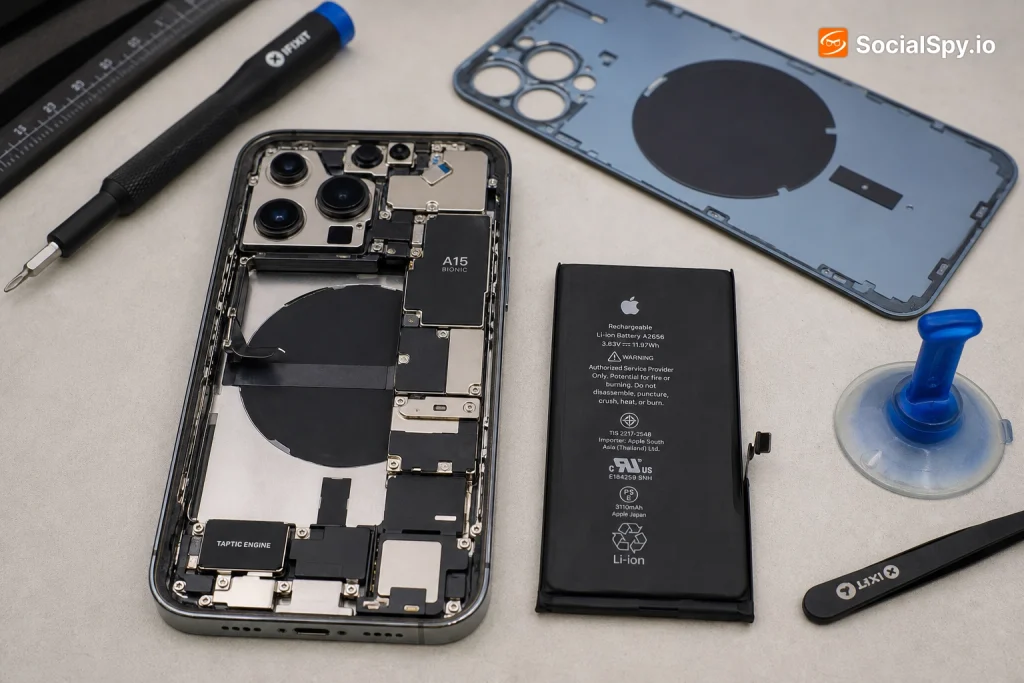
- Power down and disassembly: The two pentalobe screws near the Lightning port are removed, and the display assembly is lifted using a suction tool and opening picks — this is trickier on the 13 Pro than earlier models because Apple added extra adhesive around the display for water resistance.
- Battery disconnect: The battery connector is unplugged from the logic board first, as a safety step before removing anything else.
- Adhesive removal: Stretch-release adhesive tabs are pulled slowly at a low angle to release the battery from the chassis without damaging the housing.
- New battery installation: The replacement cell is seated, reconnected, and tested for proper voltage and charge response before the phone is reassembled.
- Reassembly and calibration: Display is resealed (ideally with new adhesive strips, not the old ones), and the phone is left to charge fully to help recalibrate the battery percentage reporting.
- Final testing: Face ID, camera alignment, and water-resistance seals are checked, since a poorly reassembled display can compromise the IP68 rating.
That water-resistance point matters more than people think. Apple explicitly notes that after any repair involving opening the case, the IP68 rating (6 meters for up to 30 minutes) is not guaranteed unless genuine parts and proper resealing procedures are used — which is one of the stronger arguments for sticking with Apple or a certified provider if you live somewhere humid or use your phone near water often.
Apple Store vs. Mail-In vs. Authorized Providers: Which Route Fits You
Not everyone lives near an Apple Store, and the three official channels behave pretty differently in practice.
- Apple Store (in-person): Fastest option if the part is in stock — often same-day, sometimes within a couple of hours. Best if you need your phone back quickly or want to watch the diagnostic happen.
- Mail-in repair (via Apple Support app or website): Apple ships you a box, you send the phone in, and it typically comes back in 3-5 business days. Good if you have a backup phone or aren’t in a rush.
- Apple Authorized Service Provider (AASP): Independently owned but Apple-trained and parts-certified — often found in Best Buy locations or standalone repair chains. Pricing matches Apple’s $99, but appointment availability can be faster in areas without a nearby Apple Store.
One thing worth flagging: AppleCare+ with Theft and Loss adds no benefit here — battery service coverage comes from standard AppleCare+, not the theft/loss tier, so don’t pay for a higher plan expecting extra battery perks.
If you’re deciding between paying Apple’s price or shopping around, it’s also useful to see how this compares across the lineup — the iPhone 11 Pro Max battery replacement guide is a good reference point since that model saw a wider price gap between Apple and independent shops after it aged out of AppleCare+ eligibility, which is roughly where the 13 Pro is headed now.
Signs You Might Need More Than a Battery (and When Replacement Isn’t Worth It)
Sometimes what looks like a dying battery is actually a symptom of something else, or the phone’s overall value no longer justifies a $99 repair.
- Phone randomly restarts even after 100% charge: Could indicate a logic board power management issue rather than pure battery wear.
- Battery replacement doesn’t fix the drain: Background app refresh, a stuck location service, or a failing storage chip can all mimic battery symptoms.
- Physical swelling or the back glass separating slightly: This is a safety issue — stop using the phone and get it serviced immediately, don’t wait for a scheduled appointment.
- Phone is already showing screen or camera issues: If you’re facing multiple repairs, do the math on total repair cost versus trading in toward a newer model.
For pure economics: a $99 battery swap on a phone that otherwise works perfectly is one of the best value repairs in consumer electronics, since a new iPhone 13 Pro currently costs $999+ even used in good condition. But if you’re also looking at a $300 screen repair or a phone that’s already four generations behind current software support, replacing the battery alone might just delay a purchase you’ll make anyway.
What to Do Before Your Appointment
A little prep avoids wasted trips and data headaches.
- Back up your phone via iCloud or a computer — most battery repairs don’t touch storage, but any repair carries small risk.
- Disable Find My iPhone temporarily if instructed, since it can block certain diagnostic and repair processes.
- Remove your case and screen protector beforehand if doing an in-person visit, to speed up intake.
- Note your Maximum Capacity percentage as a benchmark to confirm the new battery reads 100% after replacement.
- Ask specifically what battery is being installed if going to a third-party shop — genuine Apple part, Apple-certified aftermarket, or generic aftermarket all behave differently long-term.
Conclusion
The iPhone 13 Pro sits in an interesting spot: it’s recent enough that Apple genuine parts are widely available and pricing is stable at $99, but old enough that most units are now crossing that 80% capacity threshold where a replacement stops being optional and starts being necessary. The real decision isn’t really “should I replace it” — a healthy battery restores a phone that’s otherwise still fast and capable — it’s “who should do it.” Apple and its authorized providers protect your water resistance rating and avoid the “Unknown Part” battery warning, while independent shops save you $10-$30 and time if you’re comfortable with aftermarket components. Either path gets you a phone that feels new again for less than a tenth of what a replacement device costs.
FAQ
No — once a non-genuine battery is installed, the “Important Battery Message” about an unknown part typically persists even after a later genuine replacement, because it reflects the part’s serial pairing with Apple’s system, not just current battery health. The only fix is having the battery swapped again with an Apple genuine part at an Apple Store or Authorized Service Provider.
Generally no, if battery coverage is your only goal — AppleCare+ runs roughly $8-$10 per month depending on plan, which adds up to far more than the $99 one-time out-of-warranty repair cost over a typical ownership period. AppleCare+ makes more sense if you also want accidental damage coverage for drops and cracked screens.
No, a standard battery replacement doesn’t touch your storage or require any data wipe, since technicians only disconnect and swap the physical battery component. It’s still smart to back up beforehand as a general precaution any time your phone is opened, but data loss isn’t an expected part of this specific repair.