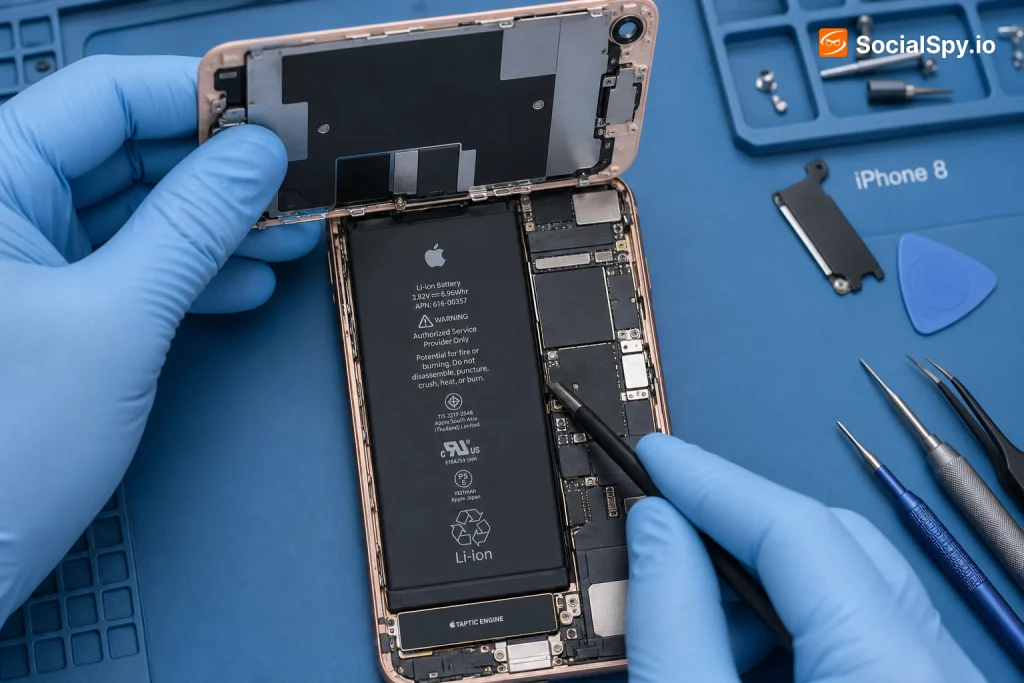
The iPhone 8 turned seven years old in 2024, which means most surviving units are now on their second or third battery cycle life—or desperately need to be. If your iPhone 8 is dying by 2 PM, shutting off randomly in cold weather, or showing a battery health percentage below 80%, you’re facing a decision millions of iPhone 8 owners have already made: pay for a replacement or upgrade to something newer.
How Much Does It Actually Cost in 2024?
Apple’s pricing for iPhone 8 battery service has stayed relatively stable for years, but it’s worth checking the current AppleCare status of your device before assuming you’ll pay full price.
- Apple Store or Apple Authorized Service Provider: $49–$69 without AppleCare, free with active AppleCare+
- Third-party repair chains (uBreakiFix by Asurion, CPR Cell Phone Repair): $40–$70 depending on region
- Independent local repair shops: $30–$60, prices vary widely by market
- DIY battery kits (iFixit, Injured Gadgets): $20–$35 for the battery plus tools
Apple actually lowered out-of-warranty battery pricing back in late 2017 as part of the fallout from “Batterygate”—the controversial performance-throttling admission—and the discounted-ish pricing structure has largely persisted since.
Here’s a quick comparison to help you decide where your money goes:
| Option | Cost | Turnaround | Warranty on Repair |
|---|---|---|---|
| Apple Store/AASP | $49–$69 | 1–3 hours (walk-in) or 1 day (mail-in) | 90 days |
| Third-party chain | $40–$70 | Same day, often 30–45 min | 90 days to 1 year |
| Independent shop | $30–$60 | Same day, often under an hour | Varies, often 30–90 days |
| DIY kit | $20–$35 | 1–2 hours (your time) | None or limited |
The price gap between Apple and independent shops has narrowed considerably compared to older iPhone models, mostly because the iPhone 8’s battery is a simple, low-capacity 1,821 mAh unit that’s cheap to source and straightforward to install—no complicated True Depth Face ID camera or Taptic Engine repositioning like on the iPhone X or later.
Signs Your iPhone 8 Battery Actually Needs Replacing
Not every performance hiccup means you need a new battery. Apple’s own threshold for recommending replacement is a Maximum Capacity below 80%, viewable in Settings > Battery > Battery Health.
Checking Battery Health Yourself
- Go to Settings > Battery > Battery Health & Charging
- Look at the Maximum Capacity percentage
- Check for the message “Peak Performance Capability” — if it says your battery has “significantly degraded,” that’s a strong signal
- Note whether performance management (throttling) has kicked in
Red Flags Beyond the Percentage
- Phone shuts down unexpectedly even when the battery shows 20-30% remaining
- Device feels noticeably slower during CPU-intensive tasks like camera launches or app switching
- Battery drains from 100% to dead in under 4-5 hours of light use
- Phone becomes unusually warm during normal charging
- Battery percentage jumps erratically (e.g., 47% to 15% in seconds)
A battery at 85% Maximum Capacity might still be perfectly livable if you’re not a heavy user. But anything under 75% on a phone this old usually means daily frustration, especially since the iPhone 8’s original capacity was already modest by today’s standards.
Apple Store vs. Third-Party: What You’re Really Paying For
Choosing where to get the repair done isn’t just about saving $20. There are real tradeoffs in parts quality, warranty coverage, and what happens to your phone’s software afterward.
Genuine Apple Parts and the “Unknown Part” Warning
Since iOS 11.3, Apple’s software checks whether an installed battery is a genuine Apple part with proper calibration. If a non-Apple or improperly paired battery is installed, you’ll see a message under Battery Health saying “Unable to verify this iPhone has a genuine Apple battery.”
- This warning doesn’t disable the phone, but it does remove some Battery Health metrics
- It can also affect resale value—buyers on eBay or Swappa often ask about this specifically
- Apple Authorized Service Providers and Apple Stores use parts that pair correctly and avoid this message entirely
What Third-Party Shops Do Differently
Most independent shops use aftermarket batteries manufactured by companies you won’t recognize, packaged to look like OEM cells. Quality varies enormously.
- Better shops source from reputable suppliers (like those Injured Gadgets or MobileSentrix carry) with legitimate mAh ratings
- Cheaper shops may use recycled or under-capacity cells that degrade within months
- Ask specifically what battery brand/source they use before booking — a shop that can’t answer is a red flag
Industry repair techs often say the real risk with cheap aftermarket batteries isn’t capacity—it’s swelling. A swollen battery can crack your screen from the inside out within a year.
What to Expect During the Repair Process
The iPhone 8’s battery replacement is mechanically simpler than most modern iPhones because it lacks the layered internal stacking of the iPhone 12 through 16 lineup.
The Physical Process
- Diagnostic check — technician verifies the battery is actually the problem, not a charging port or software issue
- Screen removal — the display is lifted (not fully detached, just flipped) using suction and a spudger
- Battery disconnect — the battery connector is unclipped from the logic board
- Adhesive removal — stretch-release adhesive strips are pulled to loosen the old battery
- New battery installation — fresh adhesive strips secure the replacement
- Reassembly and calibration — screen reseated, waterproofing seals reapplied (if using genuine Apple parts), device tested
What Gets Compromised in the Process
- Water resistance: The iPhone 8 carries an IP67 rating, but opening the case breaks the factory seal. Apple replaces seals during official service; many third-party shops don’t.
- Screen seal integrity: Repeated openings can loosen the display’s adhesive bond over time
- Taptic Engine and speaker connectors: Small ribbon cables near the battery can be nicked by inexperienced technicians
A quality repair should take 20-45 minutes of actual hands-on work. If a shop quotes you multiple hours for a walk-in, that’s either overcautious pricing padding or inexperience — the iPhone 8 isn’t a complex teardown.
Is Replacing the Battery Worth It, or Should You Upgrade?
This is the real question most iPhone 8 owners are wrestling with, and the answer depends heavily on how you use the phone and what iOS version constraints matter to you.
The Case for Replacing the Battery
- iOS support: The iPhone 8 still receives security updates through iOS 16, and Apple has kept it functional far longer than typical for a 2017 device
- Cost efficiency: A $49-69 repair is a fraction of even the cheapest new iPhone (iPhone SE 3rd gen starts around $429)
- Good enough performance: For calls, texts, basic apps, and light browsing, the A11 Bionic chip still holds up reasonably well
- Environmental impact: Extending device life by even 1-2 years reduces e-waste
The Case for Upgrading Instead
- No 5G support — if you’re on a carrier plan that charges more for 5G-capable lines, you may be leaving performance on the table
- Camera limitations — single 12MP rear camera lacks Night mode, Portrait mode improvements, and computational photography found on iPhone 13+
- Storage ceiling — many iPhone 8 units are capped at 64GB, which fills up fast with modern apps and iOS updates
- App compatibility risk — some newer apps are beginning to require iOS 17+ features unavailable on the 8
- Diminishing security update runway — Apple typically supports devices for about 5-6 years post-release; the iPhone 8’s runway is narrowing
Here’s a rough framework for deciding:
| If you… | Consider… |
|---|---|
| Use the phone lightly (calls, texts, occasional browsing) | Battery replacement — cheap and effective |
| Rely on camera quality or take lots of photos | Upgrading — camera tech has leapt forward significantly |
| Need the phone as a backup/kids’ device | Battery replacement — perfect low-stakes use case |
| Use banking, work, or security-sensitive apps daily | Upgrading — newer security architecture matters more |
| Are on a tight budget and phone otherwise works fine | Battery replacement — best dollar-for-dollar value |
Conclusion
The iPhone 8 occupies an unusual sweet spot in Apple’s lineup: old enough that a battery replacement costs less than a monthly phone bill, yet still current enough in software support to remain genuinely usable for basic tasks. If your only complaint is battery life and the phone otherwise runs smoothly, spending $49 at an Apple Store or $30-40 at a trusted independent shop is objectively the better financial move over buying anything new. But don’t kid yourself about the camera, storage, and 5G gaps — if those already bother you daily, a battery swap just delays an upgrade you’re going to make anyway. The smartest move is checking your actual Battery Health percentage first, then matching the repair decision to how you genuinely use the phone rather than how you wish you used it.
FAQ
At an Apple Store or authorized provider, walk-in service typically takes 1 to 3 hours, though some locations complete it in under an hour if parts are in stock. Third-party shops and independent repair stores often finish in 30 to 45 minutes since it’s a straightforward, non-appointment repair for most technicians.
If your iPhone 8 is still under warranty or AppleCare+, an official Apple replacement won’t void anything — that’s covered service. However, if you use a third-party shop while still under an active AppleCare+ plan, you can void the remaining coverage on the device, so check your AppleCare status in Settings before going the independent route.
Yes, kits from iFixit and similar suppliers cost around $20-35 and include the tools needed, but it requires comfort with small screws, adhesive removal, and delicate ribbon cable connectors. The main risks are damaging the display cable during the screen-lift step or improperly resealing water resistance, so it’s best attempted only if you’re reasonably confident with hands-on repairs.