The iPhone 8 Plus turns seven years old in 2024, which in smartphone years is roughly ancient history. But millions of these phones are still in daily use, and their original lithium-ion batteries are well past the point where they can reliably hold a charge. If your 8 Plus is dying by lunchtime or randomly shutting off at 30%, a battery swap is almost always cheaper and smarter than replacing the whole phone.
How Much Does an iPhone 8 Plus Battery Replacement Actually Cost?
Pricing varies more than most people expect, mostly based on who does the work and whether you value Apple’s official parts and water-resistance reseal over saving cash.
| Option | Typical Cost | Turnaround | Notes |
|---|---|---|---|
| Apple Store / Apple Authorized Service Provider | $69 | Same day (walk-in) or 3–5 days (mail-in) | Genuine battery, IP67 reseal maintained |
| AppleCare+ coverage | $0 | Same day | Only if battery health is below 80% |
| Third-party shop (uBreakiFix/Asurion, CPR) | $50–$70 | 45 min–2 hours | Aftermarket parts common, may trigger “Unknown Part” battery message |
| iFixit DIY kit | $25–$35 | 30–60 minutes (self) | Requires disassembly skill, voids any remaining warranty |
| Independent local repair shop | $40–$60 | Same day | Quality varies widely, ask about part source |
Apple’s out-of-warranty battery pricing for the iPhone 8 Plus sits in its cheapest tier — the same $69 rate applied to the iPhone 7, iPhone SE (2nd/3rd gen), and standard iPhone 8. Newer flagships like the iPhone 15 Pro run $99 or more.
A few cost details people miss:
- Sales tax and shipping aren’t included in Apple’s quoted price if you mail in the device instead of visiting a store.
- Diagnostic fees at some independent shops ($10–$20) get waived if you proceed with the repair.
- Battery-only kits from iFixit are cheaper than full “Fix Kits” that bundle every tool, but if you don’t already own a suction cup, spudger, and Y000 screwdriver, the tool cost adds up fast.
- Genuine Apple batteries sold loose (not through Apple’s official channel) are essentially nonexistent — most “OEM” batteries advertised online are pulls or aftermarket cells in Apple-style casing.
Signs Your iPhone 8 Plus Battery Needs Replacing
Apple built a diagnostic tool right into iOS after the 2017–2018 “batterygate” controversy, when it was revealed that iOS was secretly throttling performance on phones with degraded batteries to prevent unexpected shutdowns. You can check your exact battery condition in under ten seconds.
Path: Settings > Battery > Battery Health & Charging.
Watch for these indicators:
- Maximum Capacity below 80% — Apple’s own threshold for recommending replacement, and the point at which AppleCare+ users get a free swap.
- “Peak Performance Capability” warning stating the battery has degraded significantly, meaning iOS may throttle CPU speed under heavy load to avoid a shutdown.
- Unexpected shutdowns even when the battery percentage shows 20% or more remaining.
- Rapid drain — losing 10-15% while the phone sits idle in your pocket.
- Physical swelling, visible as a screen lifting away from the frame at the edges. This is a safety issue, not just an annoyance, and the phone should stop being used immediately.
- Slow charging or the phone getting unusually hot during a normal charge cycle.
The iPhone 8 Plus originally shipped with a 2,691 mAh lithium-ion cell rated by Apple to retain about 80% of its original capacity after roughly 500 complete charge cycles — one full charge cycle being any combination of partial charges that add up to 100%. For a phone charged nightly, that threshold is typically crossed somewhere between year two and year three, so a seven-year-old 8 Plus on its original battery is almost guaranteed to be well below spec.
Apple Store vs Third-Party vs DIY: What Actually Happens
Going Through Apple
Apple’s process is the most predictable but not necessarily the fastest if you can’t get to a store. Booking a Genius Bar appointment through the Apple Support app usually gets same-day service, since the 8 Plus battery swap is one of the most routine repairs Apple technicians perform. If you mail the phone in instead, expect 3 to 5 business days including shipping both ways.
Apple’s technicians replace the battery with a genuine part, re-glue the adhesive strips that hold it in place, and — critically — reseal the water-resistance gaskets around the display and charging port. That reseal matters because the 8 Plus carries an IP67 rating, and any repair that doesn’t restore the adhesive seal properly can compromise water resistance permanently.
Third-Party Repair Shops
Chains like uBreakiFix by Asurion and CPR Cell Phone Repair are Apple-adjacent but not always using Apple parts. uBreakiFix specifically has an authorized-provider relationship with Apple in many locations, meaning they can source genuine batteries and perform the repair to Apple’s standard — but only at certain locations, so it’s worth asking directly before booking.
Independent, non-affiliated shops are the wild card. Costs run lower, sometimes $10-20 cheaper than Apple, but the battery is likely an aftermarket cell.
- Pro: Lower price, often faster walk-in service, no appointment backlog.
- Con: iOS may display an “Unknown Part” message under Battery Health if the part isn’t Apple-serialized, and warranty coverage on the repair itself varies by shop (30-90 days is typical, versus Apple’s 90-day-minimum guarantee).
DIY With an iFixit Kit
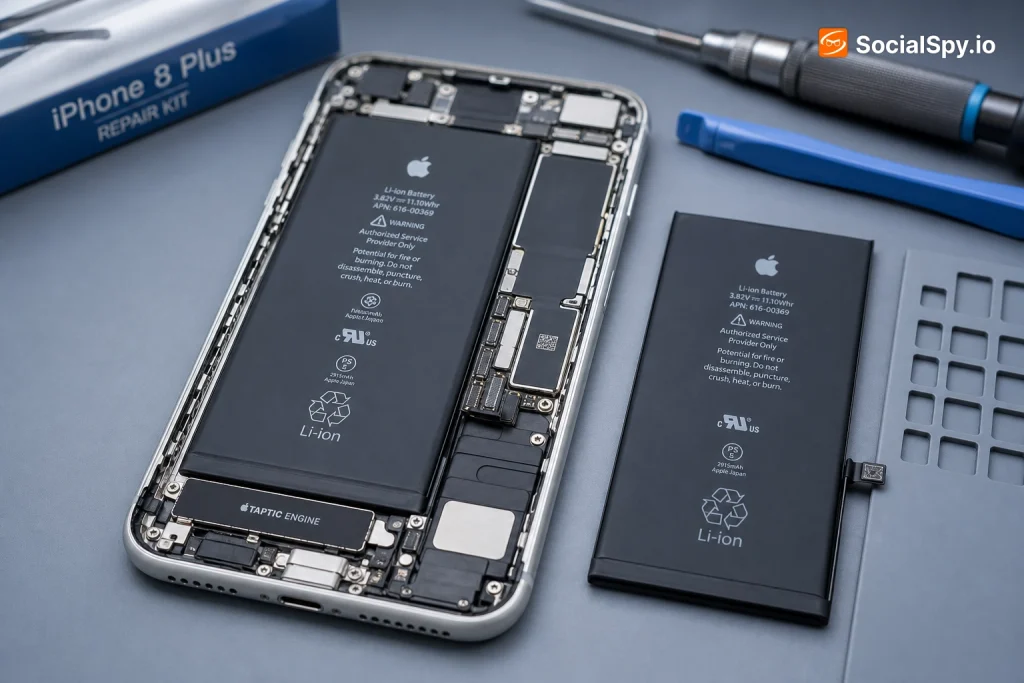
The iPhone 8 Plus scores a 6 out of 10 on iFixit’s repairability index, which is relatively fixable for a modern smartphone, but the battery replacement itself is rated moderate difficulty because of the adhesive pull-tabs and the risk of puncturing the pouch cell if you’re not careful.
- Power off the phone completely and remove the two pentalobe screws at the charging port.
- Use a suction cup and pick to lift the display, which is connected by ribbon cables you must disconnect before setting it aside.
- Peel back the battery’s adhesive pull-tabs slowly and at a low angle — pulling too fast or too steeply can tear the tab or bend the battery.
- Remove the old battery, place the new one, and reconnect everything in reverse order.
- Test the phone before fully resealing the display to confirm the battery and connectors are seated correctly.
The main risk isn’t difficulty, it’s the adhesive strips snapping mid-pull, which sometimes forces prying the battery out with a plastic tool — a dangerous move given that puncturing a lithium-ion pouch cell can cause it to swell, smoke, or in rare cases ignite.
What to Expect During the Repair
Regardless of who does the work, the mechanical process is nearly identical because the 8 Plus’s internal layout hasn’t changed since 2017. Here’s the realistic timeline and what happens at each stage.
- Backup first. Apple and most shops recommend backing up to iCloud or a computer before any repair, since a battery swap shouldn’t wipe data but display removal always carries some risk to connectors.
- Diagnostic check. Apple runs a quick software diagnostic to confirm the battery — not something else like a bad charging port or software bug — is actually the problem.
- Disassembly. The display comes off first since the battery sits beneath it, secured by adhesive strips rather than screws or clips.
- Battery swap. The old cell is removed, new adhesive strips are applied, and the new battery clicks into place.
- Reassembly and reseal. The display is reconnected, and if done properly, new adhesive gaskets restore water resistance.
- Calibration. The phone runs through a charge cycle so iOS can recalibrate its battery percentage reporting, which can be inaccurate for the first day or two after replacement.
Expect the actual hands-on repair time to run 20 to 40 minutes at a Genius Bar or repair shop. Add waiting time for walk-ins, which can push a same-day visit to 1-2 hours depending on store traffic.
Is It Worth Replacing the Battery in 2024?
This is the real question most people are actually asking, and the honest answer depends on how the rest of the phone is holding up.
Consider the math: a $69 official battery replacement on a phone that otherwise works fine is dramatically cheaper than any current iPhone. Even the cheapest new iPhone Apple sells, the iPhone SE (3rd generation), starts at $429. A well-kept iPhone 8 Plus with a fresh battery can comfortably handle calls, texting, browsing, and most App Store apps that haven’t dropped iOS 16 support (the 8 Plus tops out at iOS 16).
If your only complaint is battery life and the phone is otherwise fast enough for what you use it for, a $69 repair buys another 1-2 years of usable life for a fraction of a new phone’s cost.
But there are real limits to weigh:
- Software support is ending. The iPhone 8 Plus is on iOS 16 and unlikely to receive iOS 18 or beyond, meaning some new apps and security patches will eventually stop arriving.
- Storage constraints. Base models shipped with 64GB, which fills up fast with modern camera files and app sizes.
- Camera and speed are noticeably behind any iPhone from the last four years, particularly in low light and for video.
- Resale value of a battery-replaced 8 Plus is still modest — typically $60-100 on the used market — so the repair is really about extending personal use, not investment value.
For anyone using the phone as a backup device, a kid’s first phone, or a simple communication tool, the battery swap is close to a no-brainer. For someone relying on it as a daily driver for work, the calculus shifts toward whether a used iPhone 12 or 13 (both still fully supported and available for $200-350 used) makes more long-term sense.
Conclusion
A battery replacement on an iPhone 8 Plus is one of the best cost-to-benefit repairs left in the smartphone world — a $69 official fix, or even less through a reputable third party, against a device that otherwise still works perfectly well for calls, texting, and light app use. The repair itself is fast, low-risk when done by a professional, and doesn’t require replacing anything else on a phone that’s held up structurally for seven years. The real decision isn’t whether the repair is worth it in isolation — it almost always is — but whether the rest of the phone, particularly its dwindling software support window, still fits how you actually use it.
FAQ
Check Settings > Battery > Battery Health & Charging. If Maximum Capacity reads below 80%, or you see a “Peak Performance Capability” warning, the hardware itself has degraded and no software update will fix it — a physical replacement is the only real solution.
Yes, often iOS will show an “Unknown Part” or “Service” message under Battery Health if the replacement wasn’t installed by Apple or an authorized provider using a genuine, serialized battery. The phone will still function normally, and battery percentage reporting still works, but you lose Apple’s official verification that the part matches factory specs.
It carries more risk than replacing a battery in a laptop or a device with a removable cell, mainly because the 8 Plus battery is glued in with pull-tabs that can tear, sometimes requiring prying that risks puncturing the lithium-ion pouch. It’s manageable with an iFixit kit and patience, but anyone uncomfortable with small-parts disassembly should pay the extra $30-40 for professional installation instead.