Grok Imagine has quickly become one of the most talked-about generative AI tools of 2025, mostly because xAI built it directly into the Grok app and X’s timeline. But the moment people started using it daily, a new question took over Reddit threads and X posts: how many images and videos can you actually make before you hit a wall?
What the Grok Imagine Limit Actually Controls
Grok Imagine isn’t one single feature — it’s really two engines bolted together. One handles text-to-image generation, and the other handles image-to-video animation, which adds motion and, in many cases, synced audio to a still frame.
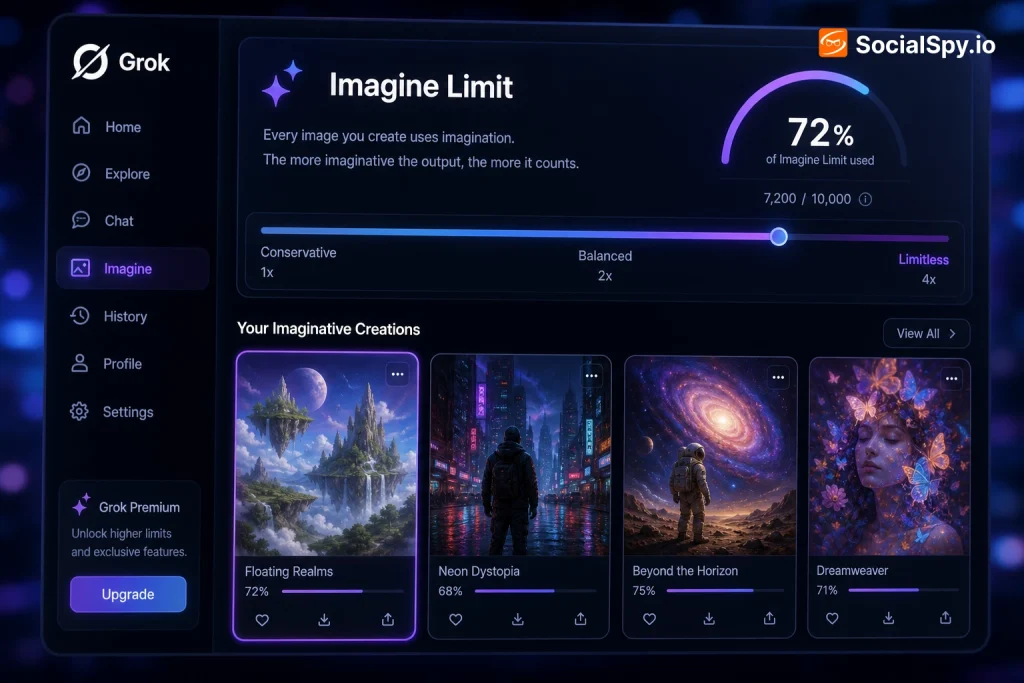
Both engines pull from xAI’s compute cluster, but video generation costs vastly more GPU time per request than a static image. That’s why the “limit” isn’t a single number — it’s actually a stack of separate caps.
- Image generation cap — how many still images you can create in a rolling 24-hour window.
- Video generation cap — a separate, usually smaller allotment for animating images into 6 to 15-second clips.
- Rate limit (cooldown) — a per-minute or per-hour throttle that prevents rapid-fire requests even if your daily total isn’t used up.
- Spicy mode cap — an additional restriction specifically on the uncensored/NSFW generation mode, which appears to carry its own moderation overhead.
Early testers have reported that hitting a limit doesn’t lock you out of Grok entirely — it just disables Imagine until the rolling window resets, usually shown as a countdown timer in the app.
Subscription Tiers and What Each One Unlocks
xAI gates Grok Imagine behind a paywall, and the limit you get is directly tied to which tier you’re paying for. There’s no fully free, unlimited version — even the base X Premium tier caps you fairly aggressively.
Here’s how the tiers generally break down based on pricing and access levels xAI has published for X and Grok:
| Tier | Approx. Monthly Price | Grok Imagine Access | Relative Limit |
|---|---|---|---|
| Free / X Basic | $0 | No access | None |
| X Premium | ~$8 | Limited or no Imagine access | Very low / restricted |
| X Premium+ | ~$40 | Full Imagine access | Moderate daily cap |
| SuperGrok | ~$30 | Full Imagine access | Higher daily cap |
| SuperGrok Heavy | ~$300 | Full Imagine access + priority compute | Highest cap, fastest queue |
- X Premium+ subscribers get Grok Imagine bundled with their X subscription, which is why many casual users first encounter it through the app’s “Imagine” tab rather than a dedicated Grok subscription.
- SuperGrok is xAI’s standalone AI subscription and tends to prioritize compute for Grok 4 and Imagine requests over general X Premium+ users during peak load.
- SuperGrok Heavy at $300/month is aimed at power users and developers who need consistent throughput, and it reportedly gets priority queue placement so requests process faster even when servers are under heavy demand.
The practical takeaway: if you’re on X Premium+ and constantly hitting limits, moving to SuperGrok doesn’t just add more generations — it also tends to reduce queue wait times, since xAI prioritizes compute allocation by tier during traffic spikes.
How the Daily and Hourly Caps Play Out in Practice
xAI hasn’t published a hard, permanent public number like “50 images per day” the way some competitors do with token counts. Instead, the limits behave more like a dynamic rolling budget that resets roughly every 24 hours and fluctuates with overall platform load.
Based on patterns widely reported by early users and testers since Grok Imagine’s August 2025 rollout:
- Image generation tends to allow the most volume — often dozens of prompts per day for paid tiers, with each prompt returning multiple image variations at once.
- Video generation is throttled much harder, often capping out in the range of a few dozen video clips daily even on paid tiers, because each clip requires substantially more inference time.
- Rapid consecutive requests (spamming prompts within seconds of each other) can trigger a temporary cooldown separate from the daily total, similar to how ChatGPT or Midjourney throttle burst usage.
- Server load spikes — particularly right after new feature launches — have caused xAI to quietly tighten limits platform-wide for a few days before restoring normal caps.
This is a meaningfully different model than something like Midjourney, which sells fixed “GPU-hours” packages you can track precisely. Grok Imagine’s limit is closer to a dynamic fair-use policy, meaning your actual daily allowance can shift depending on how busy xAI’s servers are at any given moment.
Video Length, Resolution, and the Spicy Mode Restriction
Beyond the raw count of generations, Grok Imagine also caps the quality and duration of what you can produce — and this is where the limit gets more technical.
Duration and resolution caps
Grok-generated videos are short by design. Clips generally run in the 6-to-15 second range, well below what dedicated video tools like Runway Gen-4 or OpenAI’s Sora can output in a single generation (both can stretch past 20 seconds on higher tiers). Resolution is similarly modest, optimized for mobile viewing and feed autoplay rather than production-grade footage.
- Standard image outputs typically generate in a square or portrait aspect ratio optimized for the X feed.
- Video clips include auto-generated ambient audio or lip-synced dialogue in many cases, a feature that got significant attention when Imagine launched.
- Higher-tier subscribers may get access to slightly longer clip options or faster render queues, though xAI hasn’t published exact resolution specs the way Adobe or Runway do for their tools.
The Spicy Mode limit is its own animal
Grok Imagine’s most controversial feature is “spicy mode,” a toggle that loosens content restrictions considerably compared to the default filtered mode. It made headlines almost immediately after launch for how easily it could generate suggestive content, including depictions involving real public figures, which drew swift criticism from AI safety researchers and child-safety advocates.
Industry watchdogs flagged spicy mode within days of launch as a case study in how loosely-moderated generative tools can be misused, prompting xAI to walk back and tighten some filters shortly after release.
Because of that backlash, spicy mode appears to carry an even tighter generation cap than standard mode, likely tied to additional moderation processing on the backend. Users have reported it becoming unavailable or rate-limited faster than standard image/video generation, even on paid tiers.
Grok Imagine vs. Midjourney, Sora, and Runway on Limits
To put Grok Imagine’s caps in context, it helps to see how the major competing tools handle their own usage limits. Every platform takes a different approach — some sell GPU-time packages, others use flat monthly quotas.
| Platform | Pricing Model | Approx. Limit Style |
|---|---|---|
| Grok Imagine (xAI) | Tiered subscription ($8–$300/mo) | Dynamic daily cap, tighter for video |
| Midjourney | Plan-based ($10–$120/mo) | Fixed GPU-minutes per plan, “relax mode” for unlimited slow generations |
| OpenAI Sora | Included with ChatGPT Plus/Pro | Monthly generation credits, longer clips on Pro |
| Runway Gen-4 | Credit-based ($12–$76/mo) | Credits consumed per second of video rendered |
A few key contrasts stand out:
- Midjourney’s “relax mode” is arguably the most generous limit workaround in the industry — once you exhaust your fast GPU minutes, you can keep generating indefinitely, just slower. Grok Imagine has no publicly confirmed equivalent “unlimited but slow” mode.
- Sora’s credit system under ChatGPT Pro gives clearer visibility into remaining generations than Grok’s rolling-window approach, which can feel opaque to users trying to plan a project.
- Runway’s per-second credit burn means longer, higher-resolution clips cost proportionally more, which is a very different philosophy from Grok’s flat daily-count model.
For casual social content, Grok Imagine’s limits are generally workable. For anyone trying to produce longer-form or higher-resolution video content at scale, tools like Runway or Sora currently offer more predictable ceilings.
Practical Tips for Working Within the Limit
If you’re regularly bumping into Grok Imagine’s cap, there are a few concrete adjustments that make a real difference — some obvious, some less so.
- Batch your prompts thoughtfully. Since each prompt often returns multiple image variations, refining your prompt before generating (rather than generating repeatedly with small tweaks) preserves more of your daily allotment.
- Save video generations for final outputs. Because video costs far more of your cap than images, use the image mode to iterate on composition and only convert to video once you’re satisfied with the still frame.
- Watch the reset window. The daily limit appears to operate on a rolling 24-hour basis rather than resetting at midnight, so timing your heaviest usage right after a cap resets can maximize output.
- Upgrade selectively. If you only occasionally need video, SuperGrok’s mid-tier pricing may be more cost-effective than jumping straight to SuperGrok Heavy, which is really built for high-frequency, priority-queue use cases.
- Avoid burst requests. Spacing prompts out by even a few seconds can help you avoid triggering the separate cooldown throttle that’s distinct from your daily total.
None of these tricks change the underlying cap, but they meaningfully improve how far your allotment stretches — which matters most for creators posting daily content to X.
Conclusion
Grok Imagine’s limit system reflects a broader tension in generative AI right now: platforms want to offer powerful, fast, low-friction creative tools while still controlling runaway compute costs and moderation risk. xAI’s answer has been a tiered, dynamic cap that rewards higher-paying subscribers with more headroom and faster queues, while keeping video and spicy-mode generation — the two most resource- and controversy-heavy features — on a noticeably shorter leash than standard image output.
For most casual users posting a handful of AI images or short clips to X each day, the limits on X Premium+ or base SuperGrok are rarely a serious obstacle. Where the caps really bite is for creators or businesses trying to use Grok Imagine as a production pipeline, where Midjourney’s relax mode, Sora’s credit clarity, or Runway’s per-second billing may ultimately offer more predictable value. As xAI continues iterating on Grok Imagine following its rocky, controversy-filled launch, expect the exact numbers behind these limits to keep shifting — but the tiered structure itself is almost certainly here to stay.
FAQ
You don’t lose access to Grok entirely — the Imagine feature simply becomes temporarily unavailable, usually with an in-app message or countdown indicating when your generation allowance will reset, which appears to happen on a rolling roughly 24-hour cycle rather than at a fixed daily time.
No, even the $300-per-month SuperGrok Heavy tier operates under a cap — it’s simply much higher and comes with priority queue placement, meaning your requests process faster during high-traffic periods, but xAI has not confirmed a fully unlimited generation tier for Imagine.
Video generation, especially clips with synced audio, requires substantially more GPU compute per request than a static image, so xAI throttles video outputs more tightly across every subscription tier to manage server load and cost, which is why users typically exhaust their video allotment far faster than their image allotment.