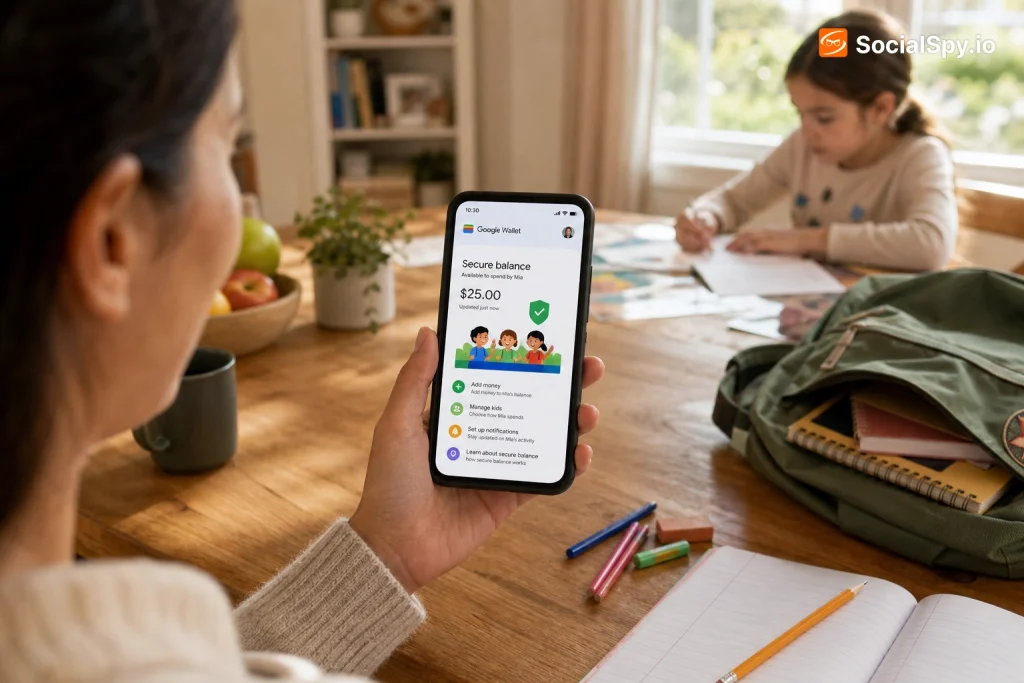
Google Wallet just closed one of the last gaps in the family fintech race: a way for parents to load real, spendable money onto their kid’s phone without handing over a full bank account. The update, rolling out now to Family Link supervised accounts in the US, turns the app kids already have on their phone into a functional debit tool their parents actually control.
It’s a quiet but significant move, because it puts Google in direct competition with dedicated kids’ banking apps that have spent years building this exact business.
What Actually Changed in Google Wallet
Until this update, Google Wallet on a kid’s supervised device was mostly a dead end. Kids could see loyalty cards, transit passes, or a movie ticket, but any attempt to add a real payment card required an adult-owned account and adult-level Google Wallet permissions.
Now Google has built a parent-issued balance feature directly into Family Link, Google’s existing parental-control layer for Android. A parent opens their own Google Wallet, selects a supervised child on their Family Link account, and creates a linked balance that funds a virtual card on the child’s device.
- Funding source: the balance draws from the parent’s existing debit card, credit card, or bank account already saved in Google Pay/Wallet.
- Where it lives: the balance shows up as a virtual card inside the child’s Google Wallet app, usable for NFC tap-to-pay wherever contactless payment is accepted.
- No separate app required: unlike GoHenry or Greenlight, there’s no standalone kids’ app to download — it’s the same Wallet interface already on the phone.
- Real-time sync: every purchase pushes a notification to the parent’s phone within seconds, the same way Family Link already flags app downloads or screen-time changes.
The practical effect is that a phone a kid already carries to school becomes a payment device, without Google having to become a bank itself. Google is essentially the plumbing; the money still ultimately comes from the parent’s existing card.
Why Google didn’t just make this a bank account
It’s worth being precise about what this isn’t. Google Wallet is not issuing debit cards, not running a ledger with FDIC-insured deposits, and not becoming a chartered financial institution.
The balance functions more like a running authorization against the parent’s card, refreshed and capped by parent-set rules, rather than a stored-value account sitting at a bank in the kid’s name. That distinction matters for liability, for regulatory overhead, and for how fast Google could ship this feature.
How Parents Actually Set It Up
The setup path runs entirely through the parent’s phone and takes a few minutes if the child already has a Family Link supervised account, which is required as a prerequisite.
- Open Google Wallet on the parent’s device and go to the new Family section.
- Select the child’s profile — pulled directly from the existing Family Link household group.
- Choose or confirm the funding card or bank account that will back the balance.
- Set an initial load amount and, optionally, a recurring allowance (weekly or monthly auto-top-up).
- Configure spending controls: daily limit, merchant category restrictions, and whether online purchases are allowed at all.
- The child’s Google Wallet app updates automatically, showing an active card ready for tap-to-pay — no action needed on their end.
Parents can also pause the entire balance instantly — useful for the classic scenario of a kid overspending at an arcade or vending machine — and every setting can be changed remotely at any time from the parent’s app.
What Kids Can — and Can’t — Do With the Balance
Google built this with guardrails clearly aimed at the 8-to-15 age range that dominates the kids’ fintech market, rather than older teens who might be closer to an independent account.
Google’s own framing in its support documentation describes the goal as giving kids “real experience managing money in a low-stakes, fully visible environment” — language that closely echoes what Greenlight and GoHenry have marketed for years.
- Tap-to-pay only in most default configurations — physical card printing isn’t part of the initial rollout, so kids can’t hand a plastic card to a cashier the way they could with Greenlight or GoHenry.
- No P2P transfers to non-family accounts by default, which limits the balance to purchases rather than sending money to friends.
- Category blocking lets parents shut off spending at categories like gambling-adjacent apps, in-app purchases, or specific merchant types.
- Spending caps can be set per transaction, per day, or per week, and the child’s app shows a real-time remaining balance so there’s no guesswork mid-purchase.
- Instant notifications land on the parent’s phone for every transaction, including merchant name and amount — mirroring the alert style Chase and Capital One already use for adult cards.
Declined transactions show the kid a plain-language reason — insufficient balance, blocked category, or daily limit reached — rather than a generic decline, which cuts down on the “why didn’t it work” texts parents get from other systems.
How This Stacks Up Against Greenlight, GoHenry, and Apple Cash
Google isn’t creating a new category here — it’s entering one that’s already crowded and, in some cases, quite mature. Greenlight has more than 6 million parents and kids on its platform and charges $4.99 to $14.98 a month depending on tier. GoHenry, now merged with UK’s Acorns-backed group, runs a similar subscription model. Apple Cash for teens, embedded in Apple’s Wallet and Family Sharing, has offered a comparable tap-to-pay experience since iOS 16.
| Feature | Google Wallet (new) | Apple Cash (Family) | Greenlight |
|---|---|---|---|
| Monthly cost | Free | Free | $4.99–$14.98 |
| Physical card | Not at launch | Optional titanium/plastic card | Included |
| Funding source | Parent’s existing card/bank | Apple Cash balance | Direct deposit or transfer |
| Investing/savings tools | None yet | None | Yes, custodial investing |
| Platform lock-in | Android only | iOS only | Cross-platform |
The obvious edge for Google is price — this feature is free, riding on infrastructure Google already built for adult Wallet users. The obvious weakness is ecosystem lock-in: like Apple Cash, it only works within its own platform, so a family with a mix of Android and iPhone devices can’t rely on it uniformly.
Greenlight and GoHenry still win on features that go beyond spending — investing education, chore-linked allowance automation, and physical cards accepted anywhere a chip reader exists, not just NFC terminals. Google’s version is leaner by design, and that’s likely intentional; it’s a feature bolted onto an existing free product, not a standalone business.
Privacy, Security, and the Fine Print Parents Should Actually Read
Any product that puts payment data in front of a minor invites scrutiny under laws like COPPA (Children’s Online Privacy Protection Act), and Google has structured this feature specifically to stay inside a Family Link supervised account rather than a standalone Google Account with independent sign-in rights.
That’s an important technical distinction. A supervised account under Family Link is legally and structurally tied to the parent’s account — the parent, not the child, is the account holder of record for consent and data purposes.
- Transaction data is visible to the parent by default and cannot be hidden by the child, even with device permissions changed locally.
- Card numbers use the same tokenization Google Wallet already applies to adult cards — the actual card number is never stored on the child’s device or shared with merchants.
- Location-based fraud checks apply the same as any Google Wallet transaction, flagging unusual merchant locations.
- Account removal is one-directional: a parent can revoke the child’s balance and Wallet access instantly, but a child cannot unlink themselves from Family Link supervision without the parent’s credentials.
The one open question security researchers will likely poke at is what happens if a family’s Google Account gets compromised — since the child’s spending balance is tied directly to the parent’s card, a hijacked parent account could theoretically expose that same card to fraud through the child’s device as an additional attack surface. Google says standard 2-Step Verification and account recovery protections extend to this feature, but it’s untested at scale.
Why This Matters Beyond Just Convenience
The bigger story here isn’t the feature itself — it’s what it signals about where Google thinks the next battleground for Android family engagement sits. Family Link already has tens of millions of supervised accounts globally, largely built around screen time and app approval.
Turning that same install base into a payments product is a low-cost way for Google to compete with a fintech category it doesn’t need to build from scratch. It also nudges families deeper into the Google ecosystem at exactly the age when brand loyalty forms — a kid who grows up tapping an Android phone to buy lunch is a kid less likely to switch to an iPhone at 16.
Industry analysts tracking the youth banking space note that Greenlight and GoHenry built multibillion-dollar valuations on a feature Google can now offer for free — the question is whether “free” is enough to pull families away from apps that also teach investing and savings habits.
There’s also a quieter retail angle. Every tap-to-pay transaction processed through Google Wallet, even a $6 vending machine purchase by a 10-year-old, is a data point about merchant categories, spending patterns, and household purchasing behavior — data Google can use across its advertising and Play Store businesses, subject to its existing privacy commitments for minors.
The Bottom Line
Google Wallet’s new kid balances won’t replace Greenlight or GoHenry for families who want investing tools, physical cards, or cross-platform flexibility. But for the enormous number of households already inside the Android and Family Link ecosystem, it removes the biggest reason to pay a monthly subscription for a competing app: a free, built-in way to give a kid supervised spending power without opening a new account anywhere else.
The real test will be adoption at scale — whether parents trust a feature that ties directly back to their own card, and whether Google keeps expanding it with things like physical cards, savings goals, or cross-platform support for mixed-device families. Right now it’s a strong, no-cost starting point rather than a complete replacement for dedicated kids’ banking apps.
Frequently Asked Questions
Does my child need their own Google Account to use this?
Yes, but it must be a Family Link supervised account linked to a parent’s Google household group — kids cannot create an independent Google Account and add this balance on their own. The parent remains the account owner for consent and control purposes.
Can my kid use this balance to shop online, not just in stores?
It depends on the settings a parent chooses during setup. Online and in-app purchases can be enabled or blocked separately from in-person tap-to-pay, giving parents a way to allow lunch-money spending while still blocking app store or web purchases.
Is there a minimum age requirement?
There’s no separate minimum age beyond what’s already required for a Family Link supervised account, which Google generally makes available for children under 13 in the US, with parental consent baked into the account creation process. Older teens with supervised accounts can use it too, though many eventually graduate to a standard adult Google Wallet account.