The iPhone 16 Pro Max packs Apple’s largest-ever smartphone battery at 4,685 mAh, but even the best lithium-ion cells degrade with daily charge cycles. If your battery health has dropped below 80% or you’re seeing unexpected shutdowns, a replacement is likely on the horizon. Here’s exactly what it costs, how the process works, and whether it’s worth doing yourself.
How Much Does It Actually Cost?
Pricing varies significantly depending on where you go and whether your phone is still covered. AppleCare+ subscribers pay nothing if the battery health has genuinely degraded to a covered threshold, but everyone else is looking at a real bill.
Here’s the breakdown across the most common service paths:
| Service Option | Typical Cost | Turnaround |
|---|---|---|
| Apple (AppleCare+ active) | $0 | Same day to 1-2 days |
| Apple (out of warranty) | $99 | Same day to 3-5 days (mail-in) |
| Independent repair shop | $60-$90 | 30-60 minutes |
| DIY kit (iFixit/self-service) | $70-$100 (parts only) | 1-2 hours |
Industry repair analysts note that battery replacement remains one of the few smartphone repairs where Apple’s official price is often competitive with, or even cheaper than, some independent shops once you factor in warranty coverage and genuine parts.
A few cost factors worth understanding:
- No AppleCare+ battery coverage kicks in only after health drops to 79% or lower — Apple won’t replace a battery sitting at 85% under warranty, even if it feels weaker than it used to.
- Apple Store walk-ins are generally faster than mailing your phone to an Apple Repair Center, though availability depends on parts stock at your local store.
- Third-party shops using aftermarket cells can be $20-$30 cheaper, but you lose Apple’s official parts pairing and may trigger a “non-genuine part” warning in Settings.
- Sales tax applies to Apple’s $99 fee in most states, pushing the real total closer to $105-$110 depending on location.
For comparison, this pricing tracks closely with what Apple charges across its recent Pro Max lineup — the iPhone 15 Pro Max battery replacement and iPhone 14 Pro Max battery replacement both sit at the same $99 out-of-warranty rate, since Apple has held this price point steady since 2018.
Signs Your Battery Actually Needs Replacing
Not every performance dip means you need a new battery. Apple built diagnostic tools directly into iOS specifically so users can check before spending money.
Checking Battery Health in Settings
Go to Settings > Battery > Battery Health & Charging. This screen shows your Maximum Capacity percentage, which compares your current battery’s charge capacity to when it was new.
- Open Settings and tap Battery.
- Tap Battery Health & Charging.
- Note the percentage under Maximum Capacity.
- Check for a Service Recommended message, which appears if Apple’s internal diagnostics flag the battery as degraded beyond normal parameters.
- Cross-reference with real-world symptoms below before booking a repair.
Real-World Symptoms Worth Watching
- Your phone dies at 20-30% battery shown on screen, a classic sign of voltage sag in an aging cell.
- Peak Performance Capability notice appears, indicating iOS has throttled processor speed to prevent unexpected shutdowns.
- The phone feels noticeably warmer than usual during normal use like browsing or calls.
- Battery percentage drops in sudden jumps (say, 40% to 25% in minutes) rather than gradually.
- Charging is dramatically slower than the phone’s rated MagSafe 25W or wired 45W-capable fast charging.
Apple’s own guidance states that a battery is considered consumable and expected to retain up to 80% of its original capacity at 1,000 complete charge cycles under normal conditions — a benchmark most heavy users hit somewhere between 24 and 30 months of daily use.
Apple Store vs. Independent Repair Shops vs. DIY
Choosing where to get the work done isn’t just about price. Each option carries different tradeoffs around parts authenticity, speed, and what happens to other features on your phone.
Apple Store or Apple Authorized Service Provider remains the safest choice for most people. You get a genuine Apple battery, technicians certified specifically on the current lineup, and — critically — no disruption to Face ID, True Tone, or the battery health reporting system, since Apple’s parts pairing recognizes its own components automatically.
Independent repair shops have gotten meaningfully better since Apple opened its Self Service Repair parts program and expanded the Independent Repair Provider network in recent years. Many now use genuine Apple parts sourced through official channels rather than gray-market cells, but it’s worth asking directly before booking.
- Ask whether the shop is part of Apple’s Independent Repair Provider Program.
- Confirm whether they’re installing a genuine Apple battery or an aftermarket equivalent.
- Get a written warranty on the repair — reputable shops typically offer 90 days to 1 year.
- Expect the job done in 30 to 45 minutes in most cases, faster than Apple’s own walk-in average.
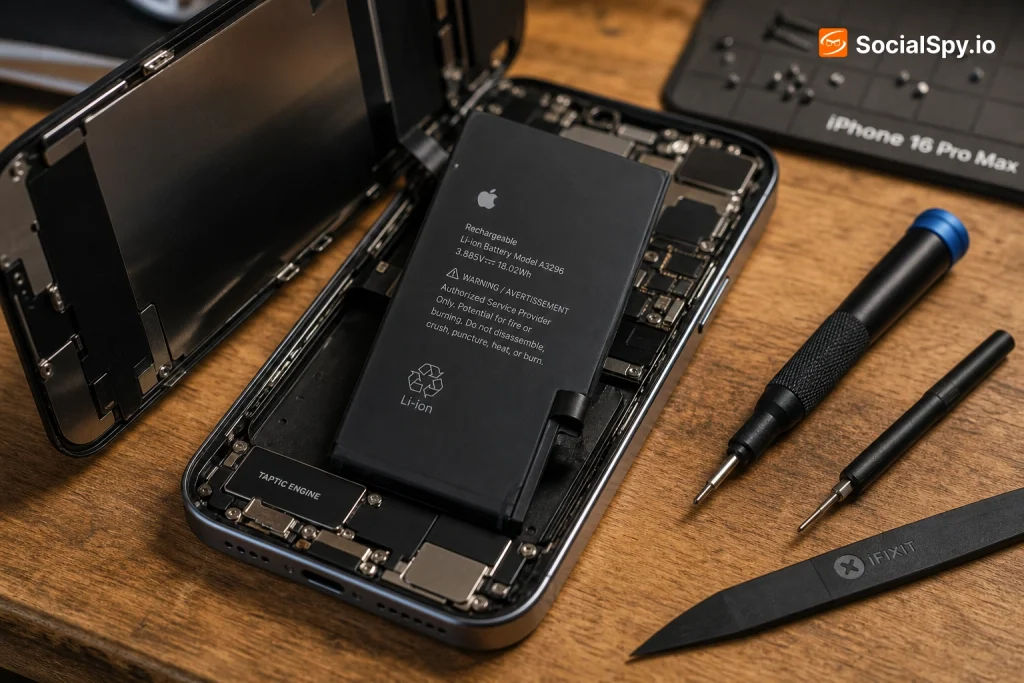
DIY replacement is technically possible but genuinely difficult on the 16 Pro Max. The battery is held in with stretch-release adhesive strips and sits beneath the logic board’s structural frame, in a chassis Apple redesigned for easier internal access compared to older models — but “easier” is relative.
Repair technicians who’ve disassembled the iPhone 16 Pro Max note that Apple’s newer internal design, including the switch to an electrically-releasing adhesive on some components, actually makes battery removal faster than on the iPhone 14 or 15 generation, provided you have the right low-voltage tool.
If you’re weighing DIY against professional service on an older device instead, the calculus shifts — for a phone like the iPhone 13 Pro Max, where the device’s resale value is lower, some owners find the DIY risk more acceptable than they would on a current flagship.
What Happens Structurally: Water Resistance, Warranty, and Data
A battery swap isn’t just a parts swap — it has downstream effects on other things you probably care about.
Water Resistance Seal
The iPhone 16 Pro Max carries an IP68 rating, and Apple only guarantees that rating with factory-original seals. Opening the case, even carefully, breaks the adhesive gasket around the frame.
- Apple Store repairs replace adhesive seals as standard procedure, restoring rated water resistance.
- Reputable third-party shops should also replace seals — ask specifically if this is included in the price.
- Budget DIY kits often don’t include replacement adhesive, leaving the phone more vulnerable to liquid damage afterward.
Your Data and Settings
Nothing about a battery swap should touch your data, but Apple’s own process includes safeguards regardless:
- Back up via iCloud or a computer before any repair, as a precaution against unrelated hardware issues discovered mid-repair.
- Face ID and biometric data are stored in the Secure Enclave and unaffected by battery replacement.
- If Apple discovers other failing components during diagnostics, they’ll contact you before doing any additional work or charging extra.
Warranty Implications
- Apple or Apple Authorized Service Provider repairs come with a 90-day warranty on the repair itself.
- Using non-Apple parts through unauthorized shops can technically void remaining AppleCare+ coverage on unrelated future repairs, per Apple’s service terms.
- AppleCare+ itself remains active after an out-of-warranty battery service, provided the phone wasn’t otherwise disqualified by prior unauthorized repairs.
Should You Repair or Just Trade In?
This is the real decision most owners are actually weighing, especially as the iPhone 16 Pro Max ages into its second and third year of ownership.
The math depends heavily on resale value versus repair cost:
| Scenario | Rough Trade-In Value | Battery Repair Cost | Better Option |
|---|---|---|---|
| 16 Pro Max, good condition, 1 yr old | $700-$800 | $99 | Repair |
| 16 Pro Max, cracked screen + battery issues | $350-$450 | $99 + screen repair | Depends on total repair cost |
| Considering upgrade to 17 Pro Max anyway | Trade-in credit varies | $99 | Trade-in likely better value |
A few practical considerations that tip the decision:
- If your phone is otherwise in excellent condition, a $99 battery swap is almost always cheaper than losing hundreds in resale value by trading in a device with an otherwise-fine screen and body.
- If you’re already planning to upgrade within the next few months anyway, skip the repair — carriers and Apple’s own trade-in program don’t meaningfully discount for battery health in most standard trade-in tiers.
- Battery replacement can also restore full processor performance if throttling was previously active, which sometimes eliminates the “my phone feels slow” complaint entirely without needing new hardware.
- For owners on the fence, checking current trade-in quotes from Apple, carriers, and third parties like Gazelle or Decluttr before committing to repair costs is worth the 10 minutes it takes.
Conclusion
The iPhone 16 Pro Max’s battery replacement math is refreshingly simple compared to screen repairs or logic board issues: $99 at Apple, roughly an hour of your time, and a device that genuinely feels new again once throttling lifts and the shutdown anxiety disappears. The bigger decision isn’t whether to fix a failing battery — it’s whether your phone, overall, still deserves the investment. For a device under two years old with a good screen and body, the answer is almost always yes. Check your Battery Health percentage today rather than waiting for a shutdown to force the decision for you.
FAQ
Check Settings > Battery > Battery Health & Charging. If Maximum Capacity reads below 80%, or you see a “Service Recommended” message, Apple’s own diagnostics consider replacement appropriate — most users notice real-world symptoms like faster drain and unexpected shutdowns around this same threshold.
Yes. Whether you’re covered by AppleCare+ or paying the standard $99 fee, Apple Stores and Apple Authorized Service Providers install genuine Apple batteries sourced through official channels, and the repair includes replacement of the water-resistance adhesive seal.
Kits typically run $70-$100 for parts alone, which isn’t dramatically cheaper than Apple’s $99 all-inclusive service once you factor in tools, adhesive replacement, and the risk of damaging the water-resistance seal or other components — for most owners, professional service offers better value for the small price difference.