The iPhone 15 Plus packs one of the largest batteries Apple has ever put in a non-Pro phone, but even a 4,383mAh cell degrades with time and daily charge cycles. If your battery health has dropped below 80% or your phone is dying by mid-afternoon, replacement is usually the fix — and the decision comes down to whether you go through Apple, an authorized provider, or an independent repair shop.
How Much Does It Actually Cost?
Apple’s official pricing for out-of-warranty battery service on the iPhone 15 Plus sits at $99, the same rate Apple charges across most of its current lineup except the Pro Max models. That price includes labor, the genuine battery, and a post-repair diagnostic check.
Here’s how the numbers break down depending on your coverage situation:
| Service Option | Cost | Turnaround |
|---|---|---|
| Apple Store / Apple Authorized Service Provider (no coverage) | $99 | Same day (walk-in) or 1-2 days (mail-in) |
| AppleCare+ (battery health under 80%) | $0 | Same day |
| AppleCare+ (battery health above 80%, replaced anyway) | $99 | Same day |
| Independent repair shop (e.g., uBreakiFix, local shops) | $70-$90 | 30-60 minutes |
| DIY kit (iFixit, etc.) | $35-$55 for parts | 1-2 hours, self-performed |
Apple only replaces a battery for free under warranty if diagnostics confirm it’s retaining less than 80% of its original capacity — cosmetic wear or slightly reduced runtime alone won’t qualify you.
Third-party shops undercut Apple by roughly $15-30, but the tradeoff is part quality. Not every independent shop uses cells with the same cycle-count durability or built-in authentication chip that Apple’s genuine batteries have, which can trigger a “non-genuine part” warning in Settings > Battery.
Is the iPhone 15 Plus Battery Different From Past Models?
The 15 Plus uses a 4,383mAh battery, slightly larger than the iPhone 14 Plus’s 4,325mAh cell, and Apple rates it for up to 26 hours of video playback. It’s built around the same USB-C charging port introduced across the entire 15 lineup, replacing Lightning for the first time.
A few things are worth knowing about this specific battery before you book a repair:
- It supports up to 27W wired fast charging (with a compatible USB-C PD charger), reaching roughly 50% in about 30 minutes.
- It carries Apple’s standard rating of retaining 80% capacity after 500 complete charge cycles under normal conditions.
- It uses an internal battery cell with a serialized authentication chip, meaning software can detect if a replacement part isn’t genuine Apple hardware.
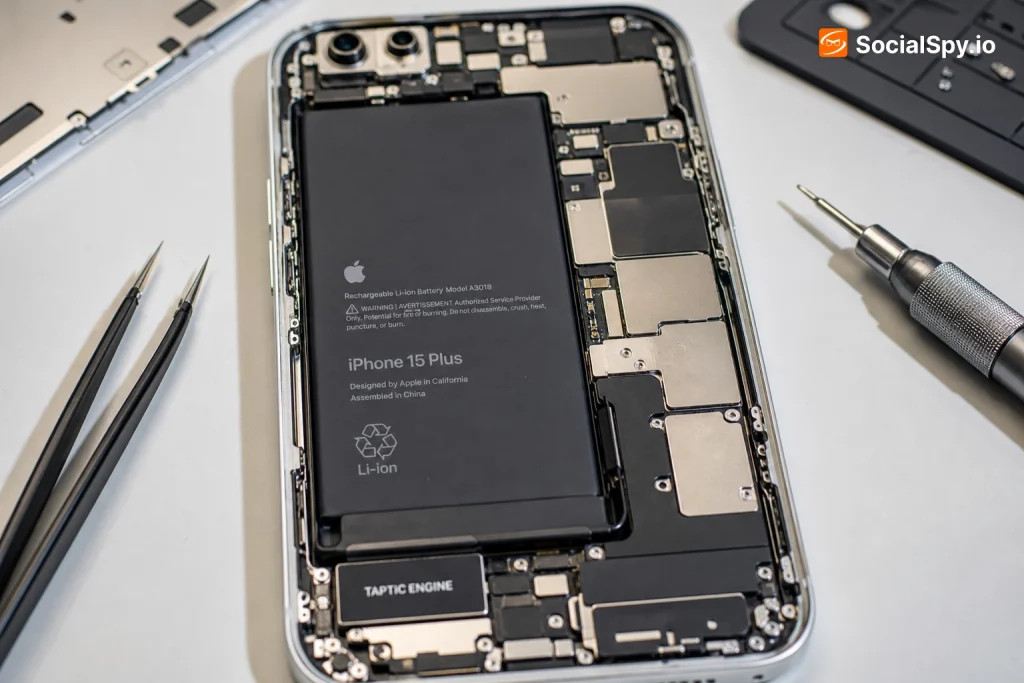
- Unlike the iPhone 14 series, the 15 Plus’s internal design uses adhesive pull-tabs powered by a low-voltage electrical release, a change Apple made to simplify battery removal without heat guns.
That last point is a bigger deal for repairability than most people realize. Apple redesigned the internal battery adhesive on the iPhone 15 lineup so technicians can apply a small current through a conductive strip to loosen the glue, rather than prying and heating the back glass. iFixit’s teardown analysis flagged this as a meaningful repairability improvement — it reduces the risk of a cracked screen or punctured battery during removal, which was a common complication with older iPhones. If you’re comparing generations, the iPhone 14 Plus battery replacement process still relies more heavily on adhesive strips that need manual pulling and occasional heat application.
Signs You Actually Need a Replacement
Not every battery complaint requires a swap. Apple’s iOS lets you check real degradation data before spending money.
Checking Battery Health Yourself
- Go to Settings > Battery > Battery Health & Charging.
- Look at “Maximum Capacity” — this is the percentage compared to when the phone was new.
- If it reads below 80%, Apple officially considers the battery degraded and eligible for service.
- Check for a “Peak Performance Capability” warning, which signals the battery can no longer supply peak power without unexpected shutdowns.
Real-World Symptoms Worth Watching
- Phone drops from 30% to shutting off unexpectedly, especially in cold weather.
- Noticeably slower app launches or throttled performance compared to when new.
- Battery percentage jumps erratically (e.g., 40% to 15% in a few minutes).
- Phone feels warm or swollen near the back — stop using it and get it serviced immediately if this happens, since a swollen battery is a safety risk.
- You’re charging more than once a day to get through normal use.
If you’re seeing any of the safety-related symptoms — swelling, excessive heat, or the phone not powering back on — don’t wait for a scheduled appointment. Apple and most authorized providers will prioritize battery safety issues same-day.
Apple vs. Third-Party: What You’re Really Choosing Between
The $20-30 savings from an independent shop is real, but it comes with tradeoffs beyond just price. Here’s a clearer picture of what each path gets you.
Apple Store or Apple Authorized Service Provider:
- Genuine Apple battery with matching authentication chip (no “Unknown Part” warning).
- Free multi-point check that can catch other issues (camera, Face ID, charging port).
- Repair is covered by a 90-day warranty on the work itself.
- Slower nationwide average wait times if you need a mail-in repair — sometimes 3-5 business days if parts aren’t in stock at your local store.
Independent / Third-Party Repair Shops:
- Faster in-and-out service, often same-visit in under an hour.
- Lower price, particularly appealing if you’re out of warranty and AppleCare+.
- Battery may not carry Apple’s authentication chip, which can trigger a persistent “Important Battery Message” in Settings.
- Warranty coverage varies wildly by shop — some offer 90 days, others just 30, and few offer nationwide honor-anywhere coverage like Apple does.
Industry repair analysts note that the “non-genuine battery” warning introduced in iOS doesn’t disable functionality, but it does remove Apple’s ability to show accurate battery health percentages going forward — a tradeoff some users don’t realize until months later.
If your iPhone 15 Plus is still under its original one-year warranty and the battery health has genuinely dropped below 80%, there’s no reason to pay anyone — Apple replaces it free. This is different territory than older devices like the iPhone 8 Plus, where any device out of warranty essentially defaults to the flat $99 (or historically $69) fee regardless of provider, since Apple no longer offers new-device warranty coverage on such old hardware.
What Actually Happens During the Repair
Apple’s process for the 15 Plus follows a fairly standardized sequence, whether you’re at a Genius Bar, an Apple Authorized Service Provider, or mailing it in.
- Diagnostic check — a quick software scan confirms battery health percentage and rules out other hardware issues causing the symptoms.
- Backup recommendation — Apple will remind you to back up via iCloud or Finder/iTunes before any repair, even though data isn’t typically affected.
- Screen and back glass separation — using the new low-voltage adhesive release method, technicians detach the display assembly.
- Battery removal — the aging cell is disconnected and pulled using the conductive adhesive strips rather than pry tools.
- New battery installation and pairing — the genuine replacement is connected, and its authentication chip pairs with the logic board.
- Reassembly and water-resistance reseal — new adhesive gaskets are applied to restore the IP68 water and dust resistance rating.
- Post-repair testing — Face ID, cameras, charging speed, and battery health readout (should now show 100%) are verified before handoff.
The entire process typically takes 30 to 45 minutes for an in-store visit, assuming the part is in stock. Mail-in service through Apple’s official repair request usually takes 3-5 business days round trip, including shipping both ways.
Conclusion
For most iPhone 15 Plus owners, this repair isn’t a difficult decision — it’s a matter of checking one number in Settings and picking a provider that fits your timeline and budget. If your battery health has fallen below 80% and you’re still under AppleCare+, book it immediately since it costs nothing. If you’re out of warranty, the $99 Apple price buys genuine parts, a proper reseal for water resistance, and a 90-day guarantee that third-party shops can’t always match — though a local independent shop can save you real money if you’re comfortable with a non-Apple part and a shorter warranty window. Either way, don’t ignore a swollen or overheating battery waiting for a convenient appointment slot; that’s the one scenario where speed matters more than price.
FAQ
Check Settings > Battery > Battery Health & Charging first. If Maximum Capacity reads below 80%, or you see a “Peak Performance Capability” warning, that’s a hardware issue software updates won’t fix — you need a physical battery replacement.
No, a standard battery replacement doesn’t touch your storage or require a factory reset. That said, Apple and most repair shops still recommend backing up beforehand as a safety precaution in case anything unexpected comes up during disassembly.
It won’t void your entire iPhone’s warranty, but it can trigger a permanent “Unknown Part” message in Battery Health settings that most buyers notice when reselling. That warning, plus the inability to show an accurate battery health percentage afterward, typically lowers resale value compared to a phone with a genuine Apple-verified battery.