The iPhone 12 Pro is now more than four years removed from its October 2020 launch, and that means its original 2,815mAh battery has cycled through thousands of charges for most owners. If your phone that used to last all day now dies by dinnertime, you’re not imagining it — you’re looking at classic lithium-ion degradation, and it’s fixable for a fraction of the cost of a new phone.
Why Your iPhone 12 Pro Battery Is Degrading
Every lithium-ion battery loses capacity over time — that’s chemistry, not a defect. Apple rates the iPhone 12 Pro’s battery for 500 complete charge cycles before it drops to about 80% of its original capacity.
A charge cycle counts as using 100% of your battery’s capacity, even if that’s spread across multiple partial charges. If you’ve owned your iPhone 12 Pro since launch and charge it roughly once a day, you’ve likely already blown past that 500-cycle mark.
- Heat exposure accelerates degradation faster than almost anything else — leaving your phone in a hot car or in direct sun does real long-term damage.
- Charging habits matter: constantly draining to 0% and charging to 100% stresses the battery more than staying between 20% and 80%.
- Fast charging (20W+ via USB-C) generates more heat per session than slow overnight charging.
- Background apps and 5G on the iPhone 12 Pro draw more power than average, adding extra cycles over the phone’s lifespan.
You can actually check your degradation level yourself. Go to Settings > Battery > Battery Health & Charging, and look at “Maximum Capacity.” Apple recommends service once that number drops below 80%, and iOS will typically show a message under Battery Health suggesting a replacement if it’s fallen significantly.
Once maximum capacity dips into the low 80s or below, most users notice unexpected shutdowns, slower performance under load, or the phone simply not making it through a full workday.
What It Actually Costs in 2025
Pricing for iPhone 12 Pro battery service has stayed fairly consistent since Apple’s post-pandemic price adjustments, but where you go changes the number significantly.
| Service Option | Price | Turnaround |
|---|---|---|
| Apple (with AppleCare+) | $89 | Same day (walk-in) or 1-2 days (mail-in) |
| Apple (out-of-warranty) | $99 | Same day (walk-in) or 3-5 days (mail-in) |
| Apple Authorized Service Provider | $99 (standard rate) | Varies by location, often 1-2 days |
| Independent repair shop | $50-$80 | 30-90 minutes, often while you wait |
| DIY kit (parts + tools) | $25-$45 | 1-2 hours, at your own risk |
Apple charges a flat $99 for out-of-warranty battery service on the iPhone 12 Pro regardless of whether you go through Apple directly or an Authorized Service Provider — this is standardized nationwide. AppleCare+ subscribers get the discounted $89 rate, and if your device qualifies for a free replacement under a manufacturer defect or an active recall, it’s naturally $0.
Why Third-Party Shops Are Cheaper
Independent repair shops like uBreakiFix, CPR Cell Phone Repair, or your local mom-and-pop electronics shop typically source aftermarket or refurbished OEM batteries rather than brand-new Apple-certified cells. That’s the main reason for the price gap.
- Aftermarket batteries can perform nearly identically to genuine Apple parts, but quality varies wildly by supplier.
- Some shops use pulled OEM batteries from damaged devices, which can be excellent quality if properly tested.
- Warranties on third-party repairs range from 90 days to 1 year, generally shorter than Apple’s coverage.
- You lose Apple’s official parts-and-service warranty the moment a non-Apple technician opens the case, though this doesn’t void your entire device warranty for unrelated issues under the Magnuson-Moss Warranty Act.
The Battery Health Warning You Shouldn’t Ignore
Starting with iOS 14, Apple introduced a battery health notice system that flags “Service Recommended” once your battery’s peak performance capability has degraded enough to potentially cause unexpected shutdowns. This isn’t Apple trying to sell you a new phone — it’s a genuine safety and performance disclosure.
Here’s what changes as your iPhone 12 Pro’s battery ages:
- Peak performance capability drops — the phone may throttle CPU speed during demanding tasks (gaming, camera processing) to prevent a shutdown from voltage sag.
- Screen-on time shrinks — a battery at 75% capacity roughly means 25% less usable time per charge compared to day one.
- Random shutdowns can occur even at 20-30% displayed charge, because aged batteries can’t deliver peak current under load.
- Cold weather performance worsens — degraded batteries lose voltage faster in temperatures below 32°F.
- Wireless charging slows further — MagSafe and Qi charging were never fast on the iPhone 12 Pro (max 15W/7.5W), and a degraded battery can make it feel even slower.
If you’re seeing the “Peak Performance Capability” warning in Settings rather than just a lower percentage number, that’s actually the more urgent flag — it means iOS has already started throttling your phone to protect it.
Apple vs. Third-Party: What You’re Actually Choosing Between
This decision comes down to more than just price. Each path has real tradeoffs worth understanding before you book an appointment.
Going Through Apple
- Uses a genuine Apple battery with matching specs and calibration.
- Comes with a 90-day warranty on the repair, covering both parts and labor.
- Preserves your device’s full warranty status and doesn’t trigger the “unknown parts” message some other repairs cause.
- Requires an appointment at an Apple Store, or mail-in service through Apple’s website, which can take a few business days if you’re not near a physical store.
- Apple will also perform a full diagnostic check on your device as part of the visit, sometimes catching other issues (bad Face ID sensor, camera problems) you didn’t know about.
Going Independent
- Often same-day, walk-in service with no appointment needed at many chains.
- Meaningfully cheaper, especially if you’re comparing multiple phones in a household.
- Quality is less predictable — ask specifically whether they use OEM, OEM-pulled, or aftermarket batteries before agreeing to service.
- Look for shops that offer at least a 1-year warranty, which the better independent chains now do to compete with Apple’s guarantee.
- Read recent reviews specifically about battery jobs, not just screen repairs, since battery work involves different tools and adhesive.
For an iPhone that’s likely to be replaced within the next year or two, an independent shop’s lower price often makes more financial sense. For a phone you plan to keep running another 3+ years, or if you’re squeamish about non-genuine parts, Apple’s route is the safer bet.
What Happens During the Actual Repair
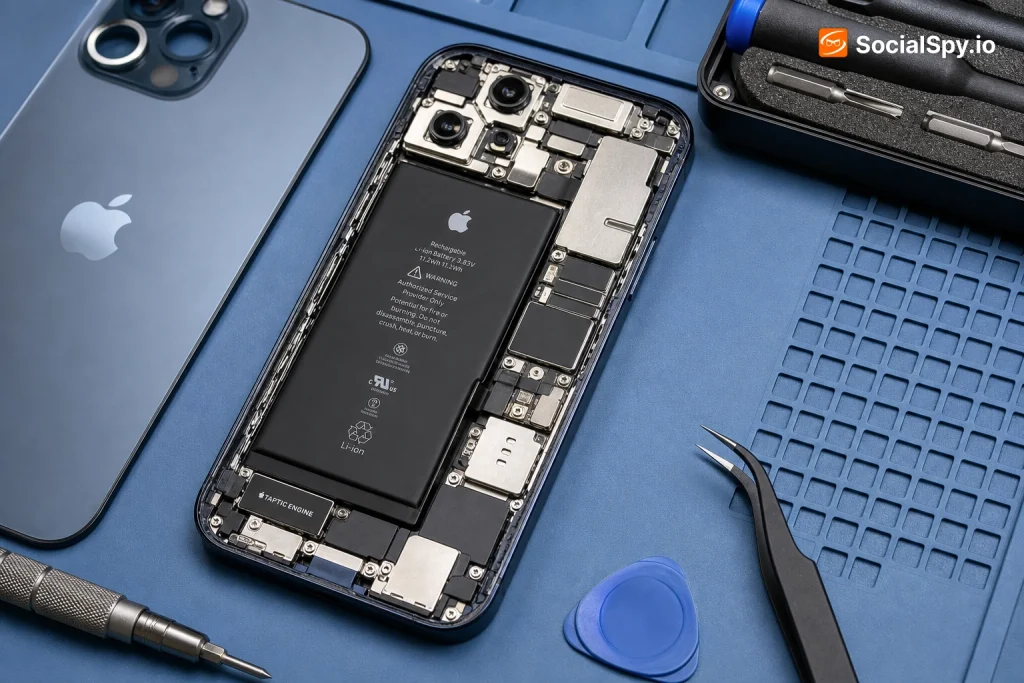
The iPhone 12 Pro’s battery is glued to the frame with stretch-release adhesive rather than the pull-tab tape used on some other models, which makes this a moderately involved repair — not something to attempt with zero tools on hand.
Here’s the realistic step-by-step process a technician follows:
- Power down the device completely and remove the two pentalobe screws next to the Lightning port.
- Heat the display slightly (or use a suction tool) to loosen the screen adhesive without cracking the OLED panel underneath.
- Disconnect the battery connector first as a safety step before doing anything else, since the iPhone 12 Pro’s battery sits directly under sensitive flex cables.
- Remove the shield plate and connector screws covering the battery and internal cables.
- Slowly pull the adhesive tabs at an angle to release the battery from the frame — this step alone can take 10-20 minutes if done carefully to avoid puncturing the cell.
- Install the new battery, reconnect all flex cables, and reseal the display with fresh adhesive.
- Run a calibration check and confirm Battery Health reporting is accurate before handing the phone back.
For most iPhones, Apple’s own tools (Battery Health calibration) reset the “maximum capacity” reading gradually over the first few charge cycles after replacement — don’t panic if it initially shows something odd like 103% or fluctuates before settling.
Signs You Actually Need a Replacement (Not Just a Software Fix)
Not every battery complaint requires a $99 repair. Before booking anything, rule out software-related drain first.
- Check Settings > Battery > Battery Usage to see if one specific app is draining power abnormally — sometimes a buggy app update, not the battery itself, is the culprit.
- Update to the latest iOS version, since Apple regularly ships battery-related bug fixes.
- Disable Background App Refresh for rarely-used apps and check if drain improves over a few days.
- Turn off Always-On Display equivalents or excessive widget refreshes if you’ve installed heavy widget stacks.
If you’ve done all that and Battery Health still reads below 80%, or you’re getting the “Service Recommended” flag, no amount of settings tweaking will fix it — the cell itself has degraded and needs physical replacement. This is the same fundamental issue owners face across the iPhone 12 lineup; the iPhone 12 battery replacement process and pricing structure is nearly identical, and even the smaller iPhone 12 Mini follows the same $99 out-of-warranty rate.
Conclusion
An iPhone 12 Pro at four-plus years old sitting at 75-80% battery health isn’t broken — it’s just at the natural end of its original battery’s useful life, and the fix is cheap relative to phone prices in 2025. Paying $99 at Apple (or $89 with AppleCare+) buys you genuine parts, a 90-day warranty, and peace of mind, while a $50-$80 independent repair gets the job done faster and cheaper if you’re comfortable with slightly more risk on part quality. Either way, spending under $100 to restore a phone that still has a great camera system and a fully capable A14 Bionic chip is a far better value proposition than spending $999+ on a new flagship — especially when the only thing actually wrong with your iPhone 12 Pro is a worn-out cell that’s easily swapped.
FAQ
Check Settings > Battery > Battery Health & Charging and look at Maximum Capacity — if it’s below 80%, or if you see a “Service Recommended” or “Peak Performance Capability” message, your battery has degraded enough to warrant replacement.
Yes, if you use a reputable shop — quality aftermarket and OEM-pulled batteries perform very close to genuine Apple parts, though warranty length and long-term reliability can vary, so check reviews and ask what brand of cell they’re installing before agreeing to the repair.
In many cases yes, because iOS throttles CPU performance specifically to prevent shutdowns when the battery can’t supply peak current — once the “Peak Performance Capability” warning appears and you replace the battery, that throttling is typically lifted and normal speed returns.