The iPhone SE has always been Apple’s budget play, but its compact battery has a well-documented tradeoff: faster degradation. Whether you’re carrying a 2016 original, the 2020 second-generation model, or the 2022 third-generation SE, chances are good you’ll be shopping for a battery replacement well before the phone itself feels obsolete.
Why the iPhone SE Battery Wears Out Faster Than You’d Expect
Apple built the SE line around a compact, familiar chassis, and that design choice comes with a real tradeoff. Every SE generation packs its battery into a case originally sized for the iPhone 6 or 8, which means significantly less battery capacity than modern iPhones.
- iPhone SE (2016): 1,624 mAh battery, roughly 10 hours of talk time
- iPhone SE (2020): 1,821 mAh battery, similar footprint to the 2016 model
- iPhone SE (2022): 2,018 mAh battery, Apple’s largest SE capacity yet, still small by 2024 standards
Compare that to the iPhone 15‘s 3,349 mAh cell or the iPhone 15 Pro Max‘s 4,422 mAh cell, and the gap is obvious. Smaller batteries cycle through their full charge more often per day, which accelerates the chemical wear that lithium-ion cells experience over time.
Battery engineers generally agree that a lithium-ion battery loses meaningful capacity after roughly 500 full charge cycles — a threshold SE owners often hit within 18-24 months of daily use, versus 2-3 years for phones with bigger cells.
That’s not a defect. It’s physics. But it does mean SE owners should expect to think about battery replacement sooner in the phone’s life cycle than owners of the standard or Pro lineup.
How to Know You Actually Need a Replacement
Apple builds a battery health metric directly into iOS, and it’s the single most reliable indicator of when to act. Go to Settings > Battery > Battery Health & Charging to see your Maximum Capacity percentage — this compares your battery’s current capacity to when it was new.
Apple’s own service guidance sets 80% maximum capacity as the line where a battery is considered “degraded” and eligible for replacement under warranty or AppleCare+ terms. Below that threshold, you’ll typically also see a message flagging “Peak Performance Capability” limitations, which historically included the throttling controversy that led to Apple’s 2018 battery-related lawsuit settlement.
Beyond the percentage number, watch for these real-world symptoms:
- Phone dies at 30-40% displayed charge instead of 0%
- Sudden shutdowns during camera use, GPS navigation, or gaming
- Noticeably slower performance compared to a fresh restart
- Phone feels warm even during light use
- Battery drains fully in under 4-5 hours of screen-on time
If you’re seeing two or more of these alongside a sub-80% health reading, replacement is worth scheduling rather than waiting.
What It Actually Costs in 2024
Pricing for iPhone SE battery service breaks down into three realistic paths, and the cost differences are bigger than most people assume.
| Service Option | Typical Cost | Turnaround Time |
|---|---|---|
| Apple Store / Apple Authorized Provider | $49 (out of warranty) | Same day, 45 min – 3 hrs |
| Independent repair shop (uBreakiFix, local shops) | $50-$80 | Same day, 30-90 min |
| DIY kit (iFixit, parts-only) | $30-$45 | 1-2 hours, self-performed |
If You Have AppleCare+
AppleCare+ subscribers get battery replacement free of charge whenever the battery’s maximum capacity drops below 80%, which is exactly the point at which most people start noticing problems anyway. Without AppleCare+, that same job costs the flat $49 rate regardless of which SE generation you own — Apple doesn’t differentiate pricing across the three models the way it does for mainline iPhones (where Pro Max batteries can run $99-$119 out of warranty).
If Your Screen Is Also Cracked
Apple’s flat battery-only pricing assumes no other damage. If your SE also has a cracked screen or other hardware issues, Apple may decline the battery-only service until other repairs are addressed, since opening a damaged unit carries added risk. This is a common surprise for owners who dropped their phone months ago and let a minor crack slide.
What Actually Happens During the Repair
The process differs meaningfully depending on where you go, and knowing what to expect saves you a wasted trip.
- Diagnostic check — Apple or the shop runs a quick battery and hardware diagnostic, sometimes revealing other issues (bad charging port, swollen battery) before work begins.
- Backup reminder — Most providers strongly recommend backing up via iCloud or Finder/iTunes first, since board-level issues occasionally surface during teardown.
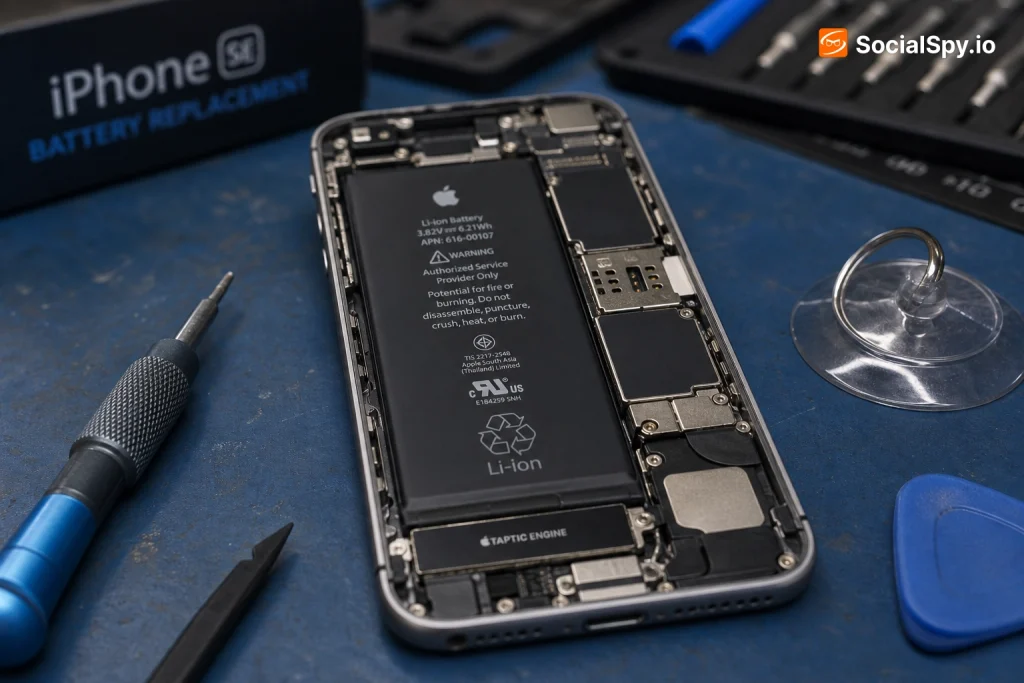
- Disassembly — For the SE 2020/2022, this means removing the display assembly (adhesive-sealed), disconnecting the battery connector, and prying the adhesive-backed cell free. The 2016 SE has a similar but slightly different internal layout.
- New battery installation — A genuine Apple battery (or third-party equivalent at independent shops) is installed with fresh adhesive strips.
- Calibration — The phone needs a full charge-discharge cycle or two before the battery percentage readings stabilize and accurately reflect real capacity.
- Water-resistance reseal — Apple Stores reapply factory adhesive to preserve the IP67 rating on 2020/2022 models; independent shops vary in whether they do this properly.
Apple technicians typically complete an SE battery swap in 45 minutes to under 2 hours at a retail Genius Bar, though mail-in service through Apple’s website adds 3-5 business days for shipping both ways.
Apple vs. Third-Party vs. DIY: The Real Tradeoffs
This decision isn’t just about price — it’s about warranty risk, parts quality, and what you’re comfortable doing yourself.
Going Through Apple
- Uses genuine Apple batteries with matching battery management firmware
- Preserves water resistance on 2020 and 2022 models via proper reseal
- Doesn’t trigger the “non-genuine part” warning that appears in Settings with third-party batteries
- Backed by Apple’s standard 90-day repair warranty
- Slowest option if you need a mail-in appointment and don’t live near an Apple Store
Going Third-Party (uBreakiFix, CPR Cell Phone Repair, local shops)
- Often same-day walk-in service with no appointment backlog
- Prices vary more — always ask if the shop uses OEM-pulled batteries vs. generic aftermarket cells
- May trigger a “Unknown Part” battery health warning in iOS if the battery lacks Apple’s authentication chip
- Some shops (uBreakiFix specifically) are Apple Authorized Service Providers and use genuine parts, which avoids that warning entirely
DIY With iFixit or Similar Kits
- Cheapest option on paper, but requires patience with adhesive removal, tiny screws, and delicate flex cables
- Apple’s own Self Service Repair Store now sells genuine parts and even loans specialty tools, a program launched in 2022 that technically extends to SE models
- Risk of damaging the display cable or battery connector is real for first-timers — iFixit rates SE battery swaps as “moderate” difficulty, not “easy”
- No warranty coverage if something goes wrong mid-repair
For most readers, the practical decision comes down to urgency and trust in a local shop. If you’re near an Apple Store and can spare an afternoon, the $49 flat rate with genuine parts and warranty backing is hard to beat. If you’re rural or need it same-day, an Apple Authorized third-party provider is the better bet than a random mall kiosk.
Is Replacement Worth It, or Should You Just Upgrade?
This is the calculation that actually matters for most SE owners, since the phone itself is inexpensive relative to a flagship.
- The iPhone SE (2022) launched at $429 for the base 64GB model
- A new iPhone SE replacement (if buying fresh in 2024, subject to Apple’s lineup changes) or a comparable budget Android runs $400-$500
- A $49 battery swap restores near-full performance and extends usable life by 1-3 years typically
- Apple has confirmed continued software support for SE models for several more years post-release, following its usual 5-6 year iOS update policy
The math strongly favors repair over replacement in almost every case. Spending $49 to revive a phone that otherwise works fine — same camera, same processor performance, same screen — is one of the best value repairs Apple offers across its entire product line. Compare that to a cracked iPhone Pro Max screen repair, which can run $329-$379 out of warranty, and the SE battery job looks almost trivial by comparison.
The only scenario where upgrading makes more sense is if your SE is also showing other signs of hardware fatigue — a failing camera module, unreliable Face ID… actually SE uses Touch ID, so a worn-out Touch ID sensor, or a home button that’s becoming unresponsive. In those cases, sinking $49 into a battery only to face another repair bill months later isn’t efficient.
Conclusion
The iPhone SE’s battery limitations aren’t a flaw to be annoyed by — they’re the direct cost of the compact, affordable design that makes the SE appealing in the first place. Knowing that upfront changes how you plan around it. Check your battery health percentage now rather than waiting for a shutdown at an inconvenient moment, and budget the $49 for Apple’s official service as your default plan unless a trusted local shop offers a compelling reason to go elsewhere. For a phone that likely cost you under $500 new, a sub-$50 repair that can add a year or two of solid daily use is about as good a deal as consumer electronics maintenance gets in 2024.
FAQ
Apple charges a flat $49 for out-of-warranty battery replacement on any iPhone SE generation (2016, 2020, or 2022), and it’s free if you have AppleCare+ and your battery’s maximum capacity has dropped below 80%.
Yes, using a kit from a supplier like iFixit or ordering genuine parts through Apple’s Self Service Repair Store, though the job involves removing the display, disconnecting delicate flex cables, and peeling out adhesive-backed cells — iFixit rates it as moderate difficulty, so first-timers should expect to spend real time and accept some risk.
It can. If a repair shop installs a battery without Apple’s authentication chip, iOS will show an “Unknown Part” message under Battery Health, though this doesn’t stop the phone from functioning — it just flags that the part isn’t Apple-verified, and choosing an Apple Authorized Service Provider avoids the warning entirely.