Apple’s redesigned internal layout on the iPhone 16 lineup quietly changed one of the most common repair errands in the country: the battery swap. With a new adhesive-pull-tab system engineered for faster removal, the process looks different than it did on the iPhone 15 and earlier models, even though the underlying battery chemistry is largely the same. Here’s what actually happens, what it costs, and when it’s worth doing.
How Much Does It Actually Cost?
Apple’s official pricing is straightforward, but it varies more than most people expect once you factor in warranty status and which model you own. The iPhone 16 and iPhone 16 Plus share one price tier, while the iPhone 16 Pro and iPhone 16 Pro Max sit slightly higher due to their larger, higher-capacity batteries and more complex internal stacking.
| Service Provider | iPhone 16 / 16 Plus | iPhone 16 Pro / Pro Max |
|---|---|---|
| Apple (out of warranty) | $99 | $99 |
| Apple (AppleCare+) | $0 | $0 |
| Independent repair shop | $70–$100 | $80–$130 |
| Mail-in third-party service | $60–$90 | $70–$110 |
- AppleCare+ covers battery replacement free of charge if the battery’s maximum capacity has degraded below 80% of original design capacity.
- Without AppleCare+, Apple charges the flat $99 rate regardless of whether the phone is under its standard one-year limited warranty (battery defects unrelated to normal wear are covered separately).
- Independent shops using aftermarket cells often undercut Apple by $20 to $30, but the battery health reporting accuracy can be inconsistent, a tradeoff worth weighing against the savings.
Industry repair-cost trackers report that Apple has held its $99 out-of-warranty price for standard iPhone battery service since 2018, even as component and labor costs elsewhere in consumer electronics have climbed steadily.
What’s Different Inside the iPhone 16
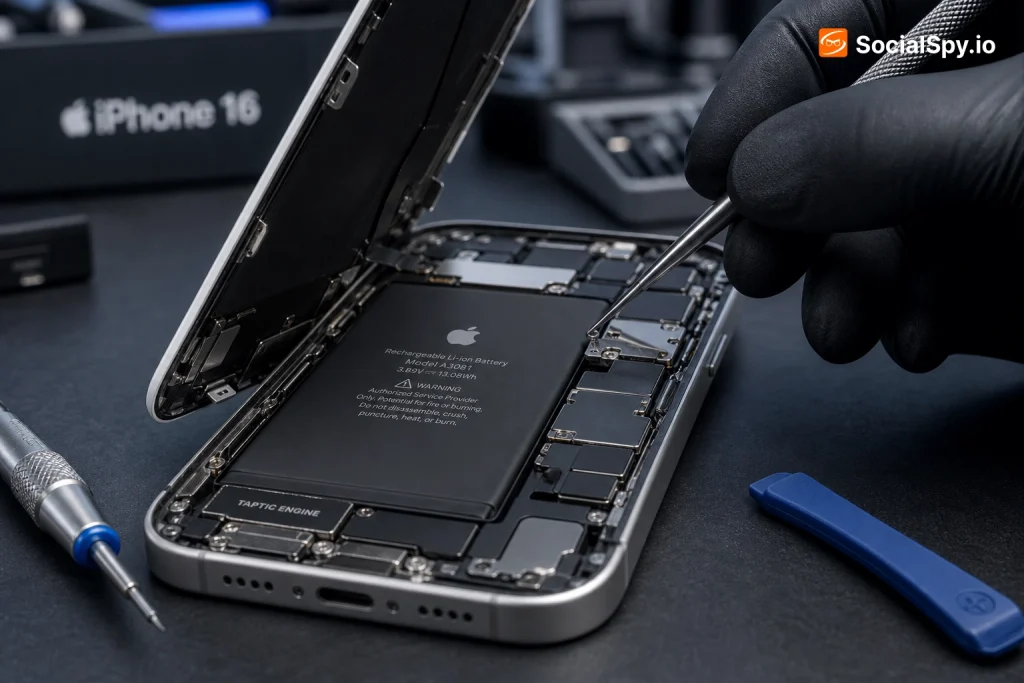
Apple redesigned the internal chassis of the iPhone 16 family specifically to make battery removal faster for its own technicians and Apple Authorized Service Providers. The company replaced the older stretch-release adhesive strips with a new electrically-induced debonding system in some configurations, alongside updated pull-tabs, that lets the battery separate from the mid-frame with less force and less risk of puncturing the cell.
This matters more than it sounds. Bent or punctured lithium-ion batteries are a genuine fire risk, and older iPhone designs occasionally required technicians to pry stubborn adhesive strips loose, increasing the odds of an accidental nick to the battery pouch.
Key Hardware Changes
- The iPhone 16 and 16 Plus use an internal structural design Apple has described as built around easier serviceability, including battery access from the back glass rather than requiring a full mid-frame teardown in every case.
- The iPhone 16 Pro and Pro Max retain a titanium frame (carried over from the 15 Pro line) but pair it with the updated adhesive-release approach.
- Battery capacities increased slightly generation over generation: the iPhone 16 Pro Max carries roughly a 4,685 mAh cell, among the largest Apple has shipped in a non-Plus-sized phone.
- Apple’s self-repair documentation for the 16 series explicitly notes shorter estimated technician time for battery jobs compared to the 15 series equivalent teardown.
For anyone comparing this to the previous generation, the iPhone 15 Pro Max Battery Replacement: Cost and What to Expect breakdown shows just how much of the repair complexity used to hinge on stubborn adhesive removal — a pain point Apple clearly tried to engineer away this generation.
Signs Your iPhone 16 Battery Actually Needs Replacing
Not every battery complaint requires a swap. iOS includes a built-in diagnostic that removes most of the guesswork, and reading it correctly saves a wasted trip to the Genius Bar.
- Open Settings > Battery > Battery Health & Charging.
- Check the Maximum Capacity percentage — this reflects the battery’s current capacity relative to when it was new.
- Look for a Peak Performance Capability message; if it states the battery is degraded enough to affect performance, that’s Apple’s clearest signal.
- Cross-reference with real-world symptoms rather than the number alone.
- Below 80% maximum capacity: Apple’s own threshold for recommending replacement, and the same threshold AppleCare+ uses to authorize free service.
- Unexpected shutdowns at charge levels above 20%, even after a software update.
- Charging speed anomalies — an iPhone 16 that no longer accepts fast charging near its rated wattage may be signaling battery-management throttling.
- Physical swelling, visible as a lifted screen or bulging back glass — this is a stop-what-you’re-doing situation, not a wait-and-see one.
A battery reporting 85% capacity after 18 months of typical use isn’t unusual; Apple’s own spec sheet promises 80% capacity retention after 1,000 complete charge cycles under standard conditions, which for most owners translates to roughly two to three years of daily charging.
Apple vs. Third-Party Repair: The Real Tradeoffs
The cheapest option isn’t always the smartest one, and the most expensive isn’t always the safest. Here’s how the two paths actually differ once you get past the sticker price.
Choosing Apple or an Authorized Provider
- Uses genuine Apple batteries with full battery health calibration — no “Unknown Part” warning in Settings afterward.
- Comes with a 90-day warranty on the repair itself, longer if it’s covered under AppleCare+.
- Typically requires an appointment, and turnaround can stretch to same-day or next-day depending on local parts stock.
- Preserves Face ID and other biometric calibration without extra steps, since Apple’s own diagnostic software re-pairs components automatically.
Choosing an Independent Shop
- Often faster, sometimes same-hour, since many shops keep iPhone 16 batteries in stock without needing to order parts.
- Usually $20 to $30 cheaper, particularly appealing for older or resale-bound devices.
- May trigger a “Genuine Apple part not installed” notification in Settings > Battery, which doesn’t disable functionality but does show up in the diagnostics panel.
- Skilled independent technicians can now use Apple’s expanded Self Service Repair parts program to source authentic batteries, closing much of the quality gap that existed a few years ago.
Apple’s Self Service Repair Store, expanded significantly since its 2022 launch, now lists genuine iPhone 16 batteries directly to consumers and independent shops alike, which has narrowed — though not eliminated — the gap between “official” and “third-party” repairs.
What to Expect During the Repair Appointment
Whether you book through Apple, an Authorized Service Provider, or a local shop, the sequence of events is fairly predictable. Knowing it in advance helps you avoid surprises, especially around data and timing.
- Diagnostic check-in: The technician runs a battery health scan and confirms the capacity percentage before proceeding.
- Backup recommendation: Most providers back up your device to iCloud or a local machine first, even though battery replacement rarely touches stored data.
- Teardown: On the iPhone 16, technicians remove the back glass panel, disconnect the battery connector, then use the updated release mechanism to lift the cell — a process Apple’s internal repair manual estimates at under 20 minutes for trained technicians, versus closer to 35–45 minutes on 15-series hardware.
- New battery installation and calibration: The replacement cell is seated, reconnected, and the phone runs a calibration cycle so Battery Health reporting is accurate from the first charge.
- Water-resistance reseal: Apple applies new adhesive seals around the back glass to restore the IP68 rating; this step is frequently skipped or done improperly by lower-cost independent shops, which is the single biggest hidden risk of a bargain repair.
- Final functional test: Face ID, wireless charging coils, and haptic feedback are checked before the phone is handed back.
- Typical in-store wait time: 45 minutes to 3 hours at an Apple Store, depending on staffing and same-day parts availability.
- Typical mail-in turnaround: 3 to 5 business days including shipping.
- DIY repair time using Apple’s Self Service kit: budget 1.5 to 2 hours for a first attempt, plus the return of the loaner tool kit within Apple’s rental window.
Should You Replace It or Trade It In?
This is the calculation that actually matters more than the repair mechanics. A $99 battery job only makes sense if the rest of the phone still has useful life left in it.
- If your iPhone 16 is under two years old and otherwise functioning well, a battery replacement is almost always the cheaper path — trading in a phone that age typically returns far less than the cost of a new one plus the value you’re giving up.
- If you’re eyeing an upgrade to the iPhone 17 lineup anyway, check Apple’s trade-in estimator first; a degraded battery can reduce trade-in value by $20 to $50, sometimes making the replace-then-trade-in math a wash.
- For resale on the secondary market (Swappa, Back Market, eBay), listings explicitly noting “battery health 100%” or a recent replacement consistently command higher offers — often enough to cover the repair cost itself.
- Owners planning to hand a phone down to a family member benefit the most from replacement, since a fresh battery effectively resets the usable lifespan by another 2-3 years of daily charge cycles.
Anyone weighing this decision against a slightly older device in the family might also compare notes with the iPhone 15 Battery Replacement: Cost and What to Expect guide, since pricing and trade-in math shift meaningfully between generations as resale values depreciate.
Conclusion
The iPhone 16’s engineering changes are a genuine improvement for anyone who eventually needs a battery swap, even if Apple’s $99 price tag hasn’t moved. Faster adhesive release means less risk of a botched teardown, shorter chair time at the Genius Bar, and a slightly lower barrier for independent shops and DIYers using Apple’s own Self Service Repair parts to do the job correctly. The real decision isn’t really about the repair itself — it’s about timing it against your Battery Health percentage, your upgrade plans, and whether AppleCare+ already has you covered for free.
FAQ
Yes, but only once the battery’s maximum capacity has dropped below 80% of its original design capacity, which Apple verifies through its own diagnostic during check-in. If the battery still tests above that threshold, AppleCare+ customers pay the same $99 out-of-warranty rate as everyone else.
It won’t void the entire warranty, but it will trigger an “Unknown Part” or “Genuine Apple part not installed” notice in Settings > Battery, and any remaining warranty coverage specifically for the battery component itself is typically forfeited. Other hardware components, like the display or cameras, generally remain covered as long as they weren’t damaged during the repair.
Apple rates its batteries for 80% capacity retention after roughly 1,000 full charge cycles, which for a typical daily user works out to about two to three years before replacement becomes worth considering. Heavy users who fast-charge frequently or regularly drain the battery to near 0% may see that threshold arrive somewhat sooner.