Two years after launch, plenty of iPhone 14 Pro owners are starting to see that dreaded “Maximum Capacity” number drop below 85% in Settings. Before you panic and trade in a phone that’s otherwise perfectly good, it’s worth understanding exactly what a battery swap costs, how long it takes, and whether it’s actually the smarter move versus buying new.
Why the iPhone 14 Pro’s Battery Degrades the Way It Does
The iPhone 14 Pro ships with a 3,200mAh lithium-ion battery, and Apple rates it for roughly 20 hours of video playback. Like all lithium-ion cells, it’s built around a chemistry that inherently degrades with charge cycles, not just calendar time. Apple defines a full cycle as using 100% of the battery’s capacity, whether that’s one full charge or several partial top-offs that add up to 100%.
Apple’s official spec states the battery should retain at least 80% of its original capacity at 1,000 complete charge cycles under normal conditions. For most people, that threshold arrives somewhere between 18 and 30 months of daily use, depending on charging habits, ambient temperature, and how often the phone is left plugged in overnight.
A few real-world factors accelerate wear on this specific model:
- Heat exposure — leaving the phone in a hot car or using intensive apps (like Pokémon GO or 4K ProRes video recording) while charging speeds up chemical degradation.
- Always-On Display — the iPhone 14 Pro’s signature always-on screen, paired with the 120Hz ProMotion display, draws more background power than prior Pro models, adding subtle extra cycle count over time.
- Fast charging habits — repeatedly using 20W+ wired fast charging or MagSafe daily generates more heat per cycle than slower charging.
- Software updates — iOS updates occasionally shift power management behavior, which is why some users see a sudden capacity percentage drop right after updating.
You can check your own battery’s health anytime by going to Settings > Battery > Battery Health & Charging. If you see a message about “Peak Performance Capability” being limited, that’s Apple telling you the battery can no longer reliably support peak power draws — a strong signal it’s time to replace it.
What Apple Charges for an Official Replacement
Apple’s pricing structure hinges entirely on whether your iPhone 14 Pro is still covered by warranty, AppleCare+, or neither.
If your battery health has fallen below 80% capacity within the first year, Apple replaces it free under the standard limited warranty — no AppleCare+ required.
Here’s how the numbers break down across coverage types:
| Coverage Status | Battery Replacement Cost |
|---|---|
| Under 1-year Apple Limited Warranty (battery below 80% health) | Free |
| AppleCare+ (any battery health level) | Free |
| No coverage (out-of-warranty) | $99 |
| Screen or other damage present, no coverage | $99 + possible additional repair charge |
That $99 out-of-warranty price has held steady across the iPhone 13 Pro, iPhone 14 Pro, and now into current models — Apple hasn’t increased Pro-tier battery pricing in several release cycles despite raising prices elsewhere in its lineup. For comparison, the standard iPhone 14 and iPhone 14 Plus batteries also run $99, since Apple prices battery service by whether a model is a “Pro” tier or standard tier rather than by exact battery capacity.
Apple offers three ways to get the work done:
- Apple Store Genius Bar appointment — same-day service in most cases, typically 1-3 hours if parts are in stock.
- Mail-in repair through Apple’s website — you ship the phone in Apple-provided packaging; turnaround is usually 3-5 business days round trip.
- Apple Authorized Service Provider (AASP) — independent stores certified by Apple, using genuine Apple parts, often with similar $99 pricing but potentially faster local scheduling.
Third-Party and Independent Repair Alternatives
Independent repair shops and mail-in services like uBreakiFix, CPR Cell Phone Repair, and countless local phone-repair storefronts will replace an iPhone 14 Pro battery for less than Apple charges — usually somewhere between $60 and $90.
The catch is quality control. Not every shop sources original Apple batteries; many use aftermarket cells manufactured by third-party battery suppliers that mimic Apple’s specs but don’t always match capacity or safety certifications exactly.
What You Gain Going Third-Party
- Lower upfront cost, often $20-40 cheaper than Apple
- Faster same-day turnaround at many local shops
- No need to back up and erase your device beforehand in most cases
- Some shops offer their own 90-day to lifetime warranties on parts
What You Risk
- Loss of “Genuine Apple Part” status — since iOS 15.2, non-genuine batteries trigger a persistent warning message in Battery Health that can’t be fully dismissed
- Voided eligibility for any remaining Apple warranty coverage on the device
- Variable battery capacity accuracy — some aftermarket cells report inflated “100% health” readings that don’t reflect real capacity
- Inconsistent water-resistance reseal quality, since the iPhone 14 Pro’s water resistance depends partly on adhesive seals disturbed during any battery swap
If your iPhone 14 Pro is still under active AppleCare+ coverage, there’s essentially no financial reason to go anywhere but Apple — it’s free either way. Once you’re out of warranty, the decision becomes a genuine cost-versus-risk tradeoff, and it’s the same calculation owners of the iPhone 13 Pro have had to make as that phone ages out of coverage too.
What Actually Happens During the Repair
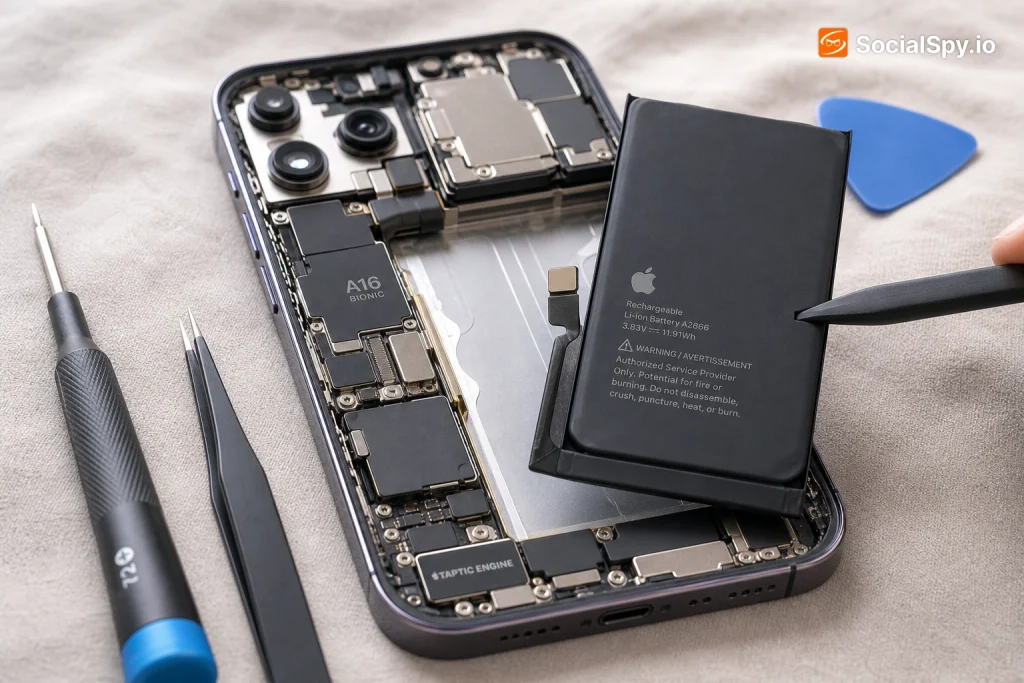
The iPhone 14 Pro’s internal design makes battery replacement more involved than on many Android phones, where batteries are sometimes user-removable. Apple uses a stretch-release adhesive system to hold the battery in place against the back-glass assembly.
Here’s the general process a technician follows:
- Diagnostic check — the phone is tested to confirm actual battery health and rule out other causes of poor performance (charging port debris, a failing charging cable, or a software bug).
- Screen or back-glass removal — depending on the repair path, technicians may access the battery through the front display assembly.
- Adhesive strip pull — thin adhesive tabs are pulled slowly (often with mild heat applied) to release the battery cell without puncturing it, since punctured lithium-ion cells pose fire risk.
- New battery installation — a fresh cell is seated and reconnected to the logic board.
- Reassembly and reseal — new adhesive and gasket seals are applied to help restore water and dust resistance.
- Calibration and testing — the phone is charged and tested to confirm the battery reports accurate health data and the device passes standard diagnostics.
Apple technicians at official stores use a proprietary calibration tool during setup so the replaced battery correctly displays health percentage and integrates with the device’s power management system. This is one reason genuine Apple repairs tend to show a clean “100%” battery health reading immediately after service, while some aftermarket jobs display inconsistent numbers for the first several charge cycles.
Before You Book: Signs You Actually Need a Replacement
Not every performance complaint traces back to the battery. It’s worth ruling out software issues first, since a full iOS update or a factory reset occasionally resolves symptoms that look identical to battery failure.
Check for these specific indicators before spending money:
- Battery Health percentage below 80% in Settings > Battery > Battery Health & Charging
- A visible “Peak Performance Capability” warning stating the battery is degraded
- The phone shuts down unexpectedly even when the reported charge is above 20%
- Swelling — a back glass that looks slightly bulged or won’t sit flush is a physical red flag, and should be addressed immediately due to fire risk, not scheduled for “whenever”
- Charging that stalls or fluctuates erratically, especially with MagSafe or wired fast charging
- Battery drains noticeably faster in cold weather, a classic symptom of aged lithium-ion cells losing chemical efficiency
If you’re seeing a swollen back panel, don’t wait for a scheduled appointment — Apple Stores will typically prioritize a same-day walk-in for a swelling battery because of the safety risk, even without a prior reservation.
Repair vs. Replace: Running the Real Numbers
For a phone that originally launched at $999 (128GB base model) in September 2022, a $99 repair is a rounding error compared to buying a new iPhone 16 Pro at $999+ or even a refurbished iPhone 15 Pro in the $650-750 range on the secondary market.
Here’s a rough comparison to frame the decision:
| Option | Approximate Cost | What You Get |
|---|---|---|
| Apple battery replacement | $99 | Restored battery life, same phone, camera/CPU unchanged |
| Third-party battery replacement | $60-$90 | Restored battery life, possible warning message, faster/cheaper |
| Trade-in toward iPhone 16 Pro | Varies, often $200-$450 credit for a 14 Pro in good condition | Brand new hardware, new camera system, updated chip |
| Sell as-is with weak battery | $250-$400 (used market, battery health disclosed) | Cash now, no repair hassle |
Industry trade-in analysts generally note that a used iPhone 14 Pro in good cosmetic condition with a weak battery sells for noticeably less than one with battery health above 90% — sometimes a $50-$80 difference in resale value. That gap alone often justifies paying for the $99 repair before selling or trading in, since it can net out roughly cost-neutral while leaving you with a phone that performs better if you decide to keep it instead.
The math shifts if you’re already eyeing an upgrade this year. In that case, it may make more sense to skip the repair, accept a lower trade-in value, and put that $99 toward the new phone instead — a calculation that applies whether you’re comparing against a 14 Plus or a Pro model going through the same aging curve.
Conclusion
The iPhone 14 Pro remains a genuinely capable phone in 2025 — its A16 Bionic chip, 48MP main sensor, and Dynamic Island are still competitive with far newer, cheaper Android handsets. A degraded battery is the single most common reason an otherwise excellent phone starts feeling obsolete, and it’s also the cheapest fix available in the entire smartphone repair category. At $99 through Apple, or somewhat less through a vetted independent shop, restoring battery health is almost always the better financial move than replacing the whole device, provided you’re not already committed to upgrading this cycle. The real decision point isn’t whether to fix it — it’s simply choosing where, and how much risk around parts and warranty status you’re willing to accept to save that last $20 or $30.
FAQ
Check Settings > Battery > Battery Health & Charging. If your phone is within its first year and the reported maximum capacity is below 80%, Apple replaces the battery free under the standard limited warranty regardless of AppleCare+ status; if you have active AppleCare+ coverage, replacement is free at any capacity level as long as it’s needed for genuine performance reasons.
Yes, using a non-Apple battery or an unauthorized repair provider can void remaining hardware warranty coverage specifically related to the battery and any components affected by the repair, and iOS will display a persistent “Unknown Part” or similar warning in Battery Health afterward. If your phone still has AppleCare+ or standard warranty time remaining, it’s almost always better to use Apple or an Apple Authorized Service Provider instead.
At an Apple Store with parts in stock, most Genius Bar battery replacements take between 1 and 3 hours, and some locations offer same-day drop-off pickup. Mail-in repairs through Apple typically take 3 to 5 business days round trip including shipping, while local third-party shops often complete the swap in under an hour.