Pinterest isn’t just a mood board anymore — it’s the second-largest search engine most marketers still underestimate, processing over 600 million monthly searches as of 2026. If your pins, boards, and profile aren’t stuffed with the right keywords, the platform’s algorithm has no idea when to show your content to the people actively searching for it.
Why Pinterest Keywords Work Differently Than Google or Instagram
Pinterest is a visual discovery engine, not a social network, and that distinction matters enormously for how keywords function on it. Unlike Instagram or TikTok, where hashtags and captions fade into a scrolling feed within hours, a well-optimized Pinterest pin can keep generating impressions 12 to 18 months after it’s published. Pinterest’s own internal data has repeatedly shown that roughly 80% of weekly Pinners discover new brands or products on the platform, and search intent there tends to be higher than on most social apps.
The algorithm relies almost entirely on text signals to understand images, since it can’t fully “see” a photo the way a human does. That means every text field you’re given — profile bio, board title, board description, pin title, pin description, and even the image file name — is a direct opportunity to tell Pinterest’s algorithm exactly what your content is about.
- Search-first behavior: Most users type specific queries (“small bathroom storage ideas”) rather than following accounts.
- Long content lifespan: Pins can resurface in search results for years, unlike a tweet or Reel.
- Text-dependent ranking: The algorithm leans on keywords, engagement, and freshness rather than facial or object recognition alone.
- Guided Search bar: Pinterest suggests related keyword chips as you type, essentially handing you free keyword research.
Industry analysts tracking Pinterest’s 2026 algorithm updates note that pins with keyword-rich titles and descriptions consistently outperform visually similar pins that skip text optimization by a wide margin in impressions within the first 30 days.
Finding the Right Keywords Before You Add Them Anywhere
Guessing keywords wastes your time and Pinterest’s crawl budget on your content. Before you touch a single pin description, you need to know what your audience is actually searching for on the platform right now.
Use Pinterest’s Own Free Tools
- Pinterest search bar autocomplete — Type a broad term like “meal prep” into the search bar and note the suggested phrases that appear; these are real, high-volume queries.
- Guided Search chips — After you search, colored chips appear below the bar (e.g., “meal prep for weight loss,” “meal prep beginners”); these are Pinterest-verified subtopics.
- Pinterest Trends — This free tool shows rising and seasonal search terms by country, letting you time content around demand spikes weeks in advance.
- Related pins carousel — Scroll to the bottom of any pin’s detail page to see what topics Pinterest algorithmically links to your niche.
Use Third-Party Research for Depth
- Keyword tools like Ahrefs or Semrush can occasionally surface Pinterest-adjacent search volume when cross-referenced with Google data.
- Pinterest Ads Manager’s keyword targeting tool shows approximate monthly search volume for specific terms even if you’re not running paid campaigns — just build a draft ad and check the suggestions.
- Manual competitor research: Search your niche and note which keywords top-performing pins repeat in their titles and first line of description.
A practical way to keep this organized is building a simple running list — some creators literally keep a keyword spreadsheet the same way they’d organize research notes elsewhere, similar to how people manage saved notes in Notability before exporting them to Google Drive for reference. The format doesn’t matter as much as consistency; you want a living document you update monthly as trends shift.
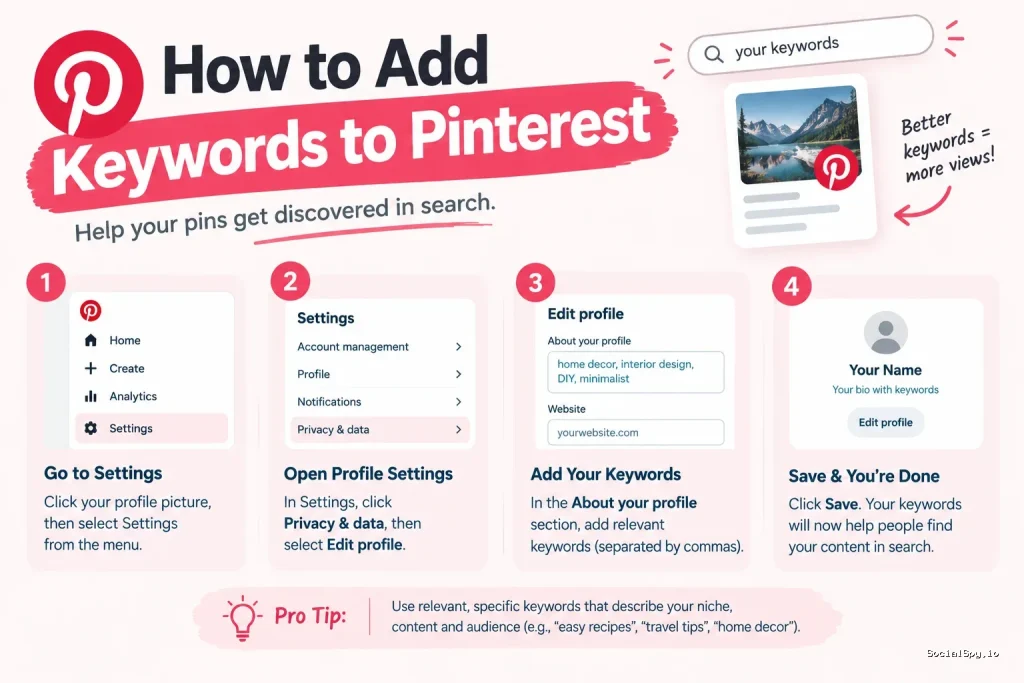
Adding Keywords to Your Pinterest Profile
Your profile is the foundation layer of Pinterest SEO, and most creators badly underuse it. Pinterest indexes your display name and about/bio section, both of which factor into whether your account itself shows up when someone searches a broad topic.
| Profile Field | Character Limit | Keyword Strategy | |
|---|---|---|---|
| Display Name | 65 characters | Add 1 niche keyword after your brand name (e.g., “Maple & Co. | Home Decor Ideas”) |
| About/Bio | 500 characters | Write 2-3 sentences naturally including 3-5 core keywords | |
| Username | 3-30 characters | Include a keyword only if brand name allows without looking spammy |
Keep the display name change subtle — Pinterest allows keyword additions, but stuffing it with five terms looks like spam to both the algorithm and human visitors. One clean, high-intent phrase attached to your brand name is enough.
Your bio should read like a normal sentence a person would say out loud, not a list of tags. Something like “Sharing budget-friendly home decor ideas, DIY furniture projects, and small space organization tips” hits three distinct keyword clusters without feeling forced. If you’re trying to grow discoverability further, it also helps to make sure your profile is easy for people to locate directly — the same principles covered in guides on how to find someone on Pinterest apply in reverse when you’re optimizing your own profile to be found by strangers searching your niche.
Adding Keywords to Boards
Boards are Pinterest’s version of category pages, and they carry more long-term SEO weight than most creators realize. A board with a vague name like “Ideas” tells the algorithm nothing, while “Small Space Apartment Organization Ideas” gives it three or four keyword signals at once.
Board Titles
- Keep titles under 40 characters for full visibility in search results and mobile previews.
- Front-load the primary keyword — Pinterest weighs earlier words slightly more heavily.
- Avoid generic single words; combine a category with a modifier (e.g., “Vegan Dinner Recipes” instead of just “Recipes”).
Board Descriptions
Board descriptions get 500 characters, and this is where you can naturally repeat and expand on your title’s keyword with related long-tail phrases. A strong template looks like this:
- State what the board covers in one sentence using the exact board title phrase.
- Add a second sentence with 2-3 related long-tail keywords.
- Close with a call to action like “Save this board for weekly inspiration.”
Boards also let you add sub-categories via section headers within a board, and yes, those section titles are indexed too. If your board is “Wedding Planning Ideas,” sections titled “Budget Wedding Tips,” “DIY Wedding Decor,” and “Wedding Hair and Makeup” each act as mini keyword clusters that widen your board’s discoverability footprint.
Adding Keywords to Individual Pins
This is where most of Pinterest’s actual search matching happens, since individual pins — not boards or profiles — are what typically surface in a user’s search results feed.
Pin Title
The pin title field allows 100 characters and shows up in bold text directly on the pin in search results. This is prime real estate.
- Put your primary keyword phrase in the first 30-40 characters.
- Write it as a benefit-driven phrase, not just a keyword string — “5-Minute Overnight Oats Recipe” beats “Overnight Oats Recipe Easy Healthy Breakfast.”
- Avoid keyword stuffing; Pinterest’s 2026 spam detection flags titles that read like a list of unrelated terms.
Pin Description
Descriptions allow 500 characters, and while Pinterest de-emphasized description weight slightly compared to a few years ago, it still matters for long-tail search matching and for giving context to Pinterest’s visual AI.
- Write 2-3 sentences naturally, mentioning your primary keyword once and 2-3 secondary keywords.
- Include a light call to action (“Click through for the full recipe”) since Pinterest does track click-through as a ranking factor.
- Skip hashtags in descriptions — Pinterest has shifted almost entirely away from hashtag search since 2023, and by 2026 they carry negligible ranking value on organic pins.
Alt Text
Alt text is arguably the most underused keyword slot on the entire platform. It’s meant for accessibility, but Pinterest explicitly crawls it for SEO context, and very few creators fill it in.
- Write a literal, specific description of what’s in the image, including your target keyword.
- Keep it under 500 characters, though 1-2 sentences is plenty.
- Never leave it blank — an empty alt text field is a missed keyword opportunity every single time you post.
Image File Name
Before uploading, rename your image file from something like “IMG_4521.jpg” to “small-bathroom-storage-ideas.jpg.” Pinterest’s crawler does read file names as a minor secondary signal, and it costs zero extra effort.
Advanced Keyword Placement Most Creators Skip
Beyond the obvious fields, there are a handful of secondary spots where keyword placement compounds your visibility over time.
- Rich Pins metadata: If you run a blog or e-commerce site connected via Rich Pins, the title and meta description pulled from your website’s own SEO tags feed directly into Pinterest, so optimizing your website copy indirectly optimizes your pins too.
- Pinterest TV / Idea Pins captions: Video pin captions and on-screen text are increasingly parsed by Pinterest’s updated visual recognition system rolled out through 2025-2026, meaning spoken or displayed keywords in video content now carry more weight than they used to.
- Board follow suggestions: Pinterest groups boards with similar keyword profiles together for cross-promotion, so consistent keyword themes across your whole account (not just one board) improve overall account authority.
- Seasonal keyword refreshing: Updating a pin’s title or description with a current-season keyword (e.g., swapping “summer” for “fall” phrasing) can trigger a fresh crawl and renewed impressions on an old pin, extending its lifespan.
- URL slugs on linked pages: If your pin links to a blog post, having the keyword in the URL slug itself reinforces the Rich Pin metadata match.
Creators managing content calendars across multiple platforms often find it useful to plan keyword refreshes the same structured way they’d plan any recurring content task — the kind of routine scheduling logic used when syncing something like a Canvas calendar into Google Calendar applies just as well to setting quarterly reminders for refreshing your top-performing Pinterest pins’ keywords.
Conclusion
Pinterest keyword optimization isn’t a one-time setup task — it’s an ongoing discipline that rewards consistency more than cleverness. The creators seeing real traffic gains in 2026 aren’t the ones chasing viral pins; they’re the ones methodically filling every text field the platform offers, from board sections to alt text, with researched, specific phrases their audience is already typing. Start with your profile and top three boards this week, use Pinterest Trends before you write a single new description, and treat every pin’s alt text as seriously as its title — that combination alone will move most accounts ahead of 90% of competitors still leaving those fields blank or generic.
FAQ
Aim for one primary keyword and two to three closely related secondary keywords woven into two or three natural sentences. Stuffing more than that into a 500-character field usually triggers Pinterest’s spam filters and reads awkwardly to human viewers, which hurts click-through rate and indirectly hurts your ranking anyway.
No, not meaningfully. Pinterest shifted its search algorithm away from hashtag indexing starting back in 2023, and by 2026 hashtags function more like decorative labels than actual search-ranking signals, so your keyword effort is far better spent on titles, descriptions, and alt text.
Yes, and it’s one of the most effective low-effort tactics available. Updating a pin’s title, description, or alt text with a fresher or more specific keyword phrase often triggers Pinterest to re-crawl and re-serve the pin in search results, sometimes reviving impressions on content that’s been dormant for months.